
Cloud Version Control for SolidWorks without Servers or VPN
Redirecting...
- No prep needed. We’ll show version control running live on real SolidWorks files.
- Works alongside your current process while you evaluate your PDM.


based on reviews on

and

Trusted by the world's top mechanical engineering teams






SolidWorks Version Control without Implementation Cost
On‑premise PDM: powerful, but typically expensive to roll out, hard to access remotely, and not always loved by the people who have to use it every day.
Shared folders: quick to start, but revisions, approvals, and “who has the latest” become difficult the moment more than one person is involved.
Sibe is the middle path: cloud PDM built for SolidWorks that gives you real version control and collaboration without the overhead that comes with on-premise PDM. Sibe Cloud PDM does not require any server, deployment cost, or VPN to run version control:
- No server provisioning.
- No VPN required for remote access.
- No “deployment cost and time” before your first version is tracked.
The only cloud PDM with a native Add-in for SolidWorks that doesn't break the bank
Track every version with confidence
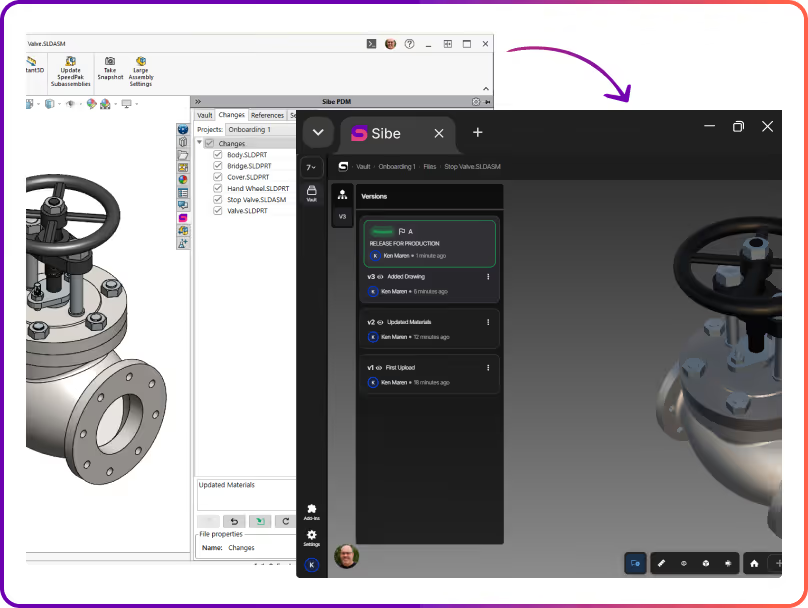
Sibe creates a new version when files are checked in, and each version includes who changed it, when it changed, and an optional change note. That means you’re not relying on file renaming conventions or memory to reconstruct what happened.
If your team has ever hunted through v2, v3, and “approved” folders, you already know why this matters.
- Clear version timeline for every file.
- See what changed, when, and by whom.
- Roll back to any previous version.
Watch it happen live!
Prevent accidental overwrites
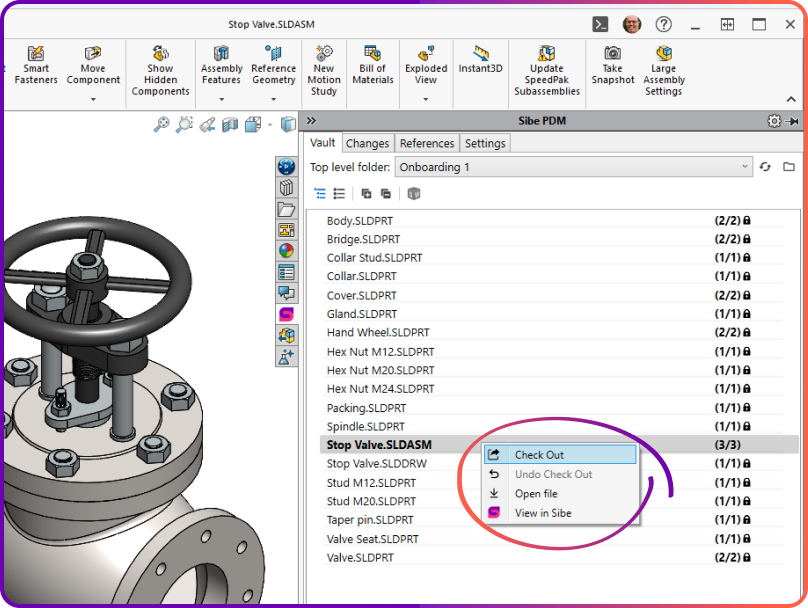
When an engineer checks out a file, everyone else sees it's locked for editing. No one can save changes over the top. Sibe PDM's check-out / check-in model lets your team work in parallel without losing work.
- Only one engineer can edit a file at a time.
- Everyone else can still view the latest version.
- No confusion when work moves to review.


Lightweight Release Control
You don’t need a complicated workflow diagram to stop revision mistakes. Sibe supports lightweight release control so your team can mark what’s ready for review, what’s approved, and what’s released—without slowing engineering down.
- Simple statuses your team will actually use.
- Clear visibility into what’s safe to manufacture.
- Auditability without extra admin overhead.
Share versions easily with non-CAD reviewers
Version control breaks down fastest when a model leaves the engineering team. Sibe makes it easy to share the latest version for review — no more emailing files back and forth.
Send a secure link for any file or assembly.
Reviewers open files in the browser — no SolidWorks licence needed.
Feedback stays tied to the exact version reviewed.
Watch it happen live!
IP Protection Without Slowing Collaboration Down
Works for Everyone — Inside and Outside the Company
Sibe is designed for modern engineering teams, where the work doesn't stop at the company boundary. Whether you're co-developing with a partner, getting quotes from a supplier network, or walking a customer through a design review, the sharing experience is the same: fast, secure, and frictionless.
Internal engineers access the vault through the SolidWorks add-in or web app
External partners and customers access via browser link — no account required
No VPN. No IT ticket. No file sent over email.
"Sibe has the same functionality as Vault PDM, but without the excessive cost of servers and data migration."

Tomasso Vitale
Engineering Manager,
Hirata Corporation of America
"I’m very impressed with Sibe.io - their R&D team came up with a new approach to managing CAD design data that is simple and cost-effective."

Salimzhan Gafurov
Director of Advanced Research & Technology,
Verne

SOC 2 Audited
Audited for Service Organization Controls (SOC 2 Type II) compliance.

Data Encryption & Backups
AES-256 encryption with daily backups and disaster recovery protocols.

Google Cloud Partner
Hosted on Google Cloud with data centers in Europe and the United States.
Frequently Asked Questions
Connect SolidWorks and start with a single project in 30 minutes, once the add-in is installed and a workspace is created. During the demo, we’ll show the setup end‑to‑end so you can see what it looks like in real life. Book a demo here.
Sibe works with SolidWorks versions 2019–2026. The connector installs as a standard SolidWorks add-in. The connector installs as a standard SolidWorks add‑in, set up takes 30 minutes.
No server provisioning is required, and remote access does not depend on a VPN. That’s one of the main reasons teams use cloud PDM instead of maintaining an on‑prem setup.
Yes, most engineers evaluate Sibe PDM with a subset of files while continuing their current workflow for everything else. This reduces risk and makes it easy to compare day‑to‑day usability before switching anything fully.
Import existing SolidWorks files into Sibe, and version tracking starts from that point. Assemblies that reference parts and drawings are preserved as part of the import so you don’t lose relationships.
No. Sibe tracks file relationships inside the vault, so references stay intact when files are moved or renamed within Sibe PDM.
Sibe uses a check‑out/check‑in approach so when someone is editing a file, others can’t accidentally overwrite it. This reduces conflicts and removes the “who saved last?” risk.
Yes—non‑CAD teammates (and clients) can review via the browser, tied to a specific version, so feedback maps to the exact revision. This helps avoid approvals based on the wrong file export.
Data is encrypted at rest and in transit, and access can be controlled at workspace/project/file level. Sharing links can be permission-scoped and revoked when needed.
Pricing is public and transparent—no “quote-only” gating. You can view plans here: https://www.sibe.io/pricing
If you want a quick explainer page first, you can visit our Cloud Based PDM page.
Book a free Demo with Ken to see Sibe PDM in action


Ken Maren
Chief Solutions Architect
SolidWorks Expert with 30+ Years Experience
Our Customer Success team will get back to you within one business day to schedule the demo call.

.svg)