
Kenesto Alternative for SolidWorks Teams,
a Native Add-In With Automatic Assembly References
Redirecting...
- No prep needed. We’ll show version control running live on real SolidWorks files.
- Works alongside your current setup while you evaluate.

What your team gets on day one
- No server provisioning.
- No VPN required for remote access.
- No setup time before your first version is tracked.
Trusted by SolidWorks engineering teams across industries




“We're remote. The designer is in Philadelphia, our CTO is in Miami, and I'm in Austin. We needed a way to design, review, and release without everyone sitting in the same place — or even in the same software.”









Sibe vs. Kenesto
Compare two professional cloud-based solutions by engineering architecture and collaboration logic.
Platform Focus
Built for SolidWorks only. Check in and out without leaving the CAD window
SolidWorks add-in available
Client Install
Lightweight Add-in (~60 MB)
Kenesto Drive service (Virtual K: Drive) + Add-in on top
Assembly Logic
References update automatically on move, rename, delete and import
Supported via add-in (Dependencies, Rename, Replace, Where Used)
External Sharing
Free unlimited web visitors: link or QR code, no account needed
External share links with granular permissions; per-user subscription pricing
Deployment
Under 20 minutes (self-serve)
Varies by IT environment
Core version control
- Check-in / Check-out
- Automatic Version History
- OS: Web (Any) / Add-in (Windows)
- Check-in / Check-out
- Automatic Version History
- OS: Windows 10/11
Information on Kenesto based on publicly available product documentation from kenesto.com and its support portal, verified September 2026. Product features and pricing may have changed since this date. Refer to kenesto.com for the latest details.
CAD Management & Collaboration workflows purpose-built for SOLIDWORKS Teams
Sibe gives SolidWorks teams version control inside CAD, revision and approval workflows, browser-based reviews for clients and partners, live BOMs generated from the assembly, and automated production exports on release. No servers, no VPNs, no IT hassles.


Version control on a native SolidWorks add-in, at a price a small team can sign off
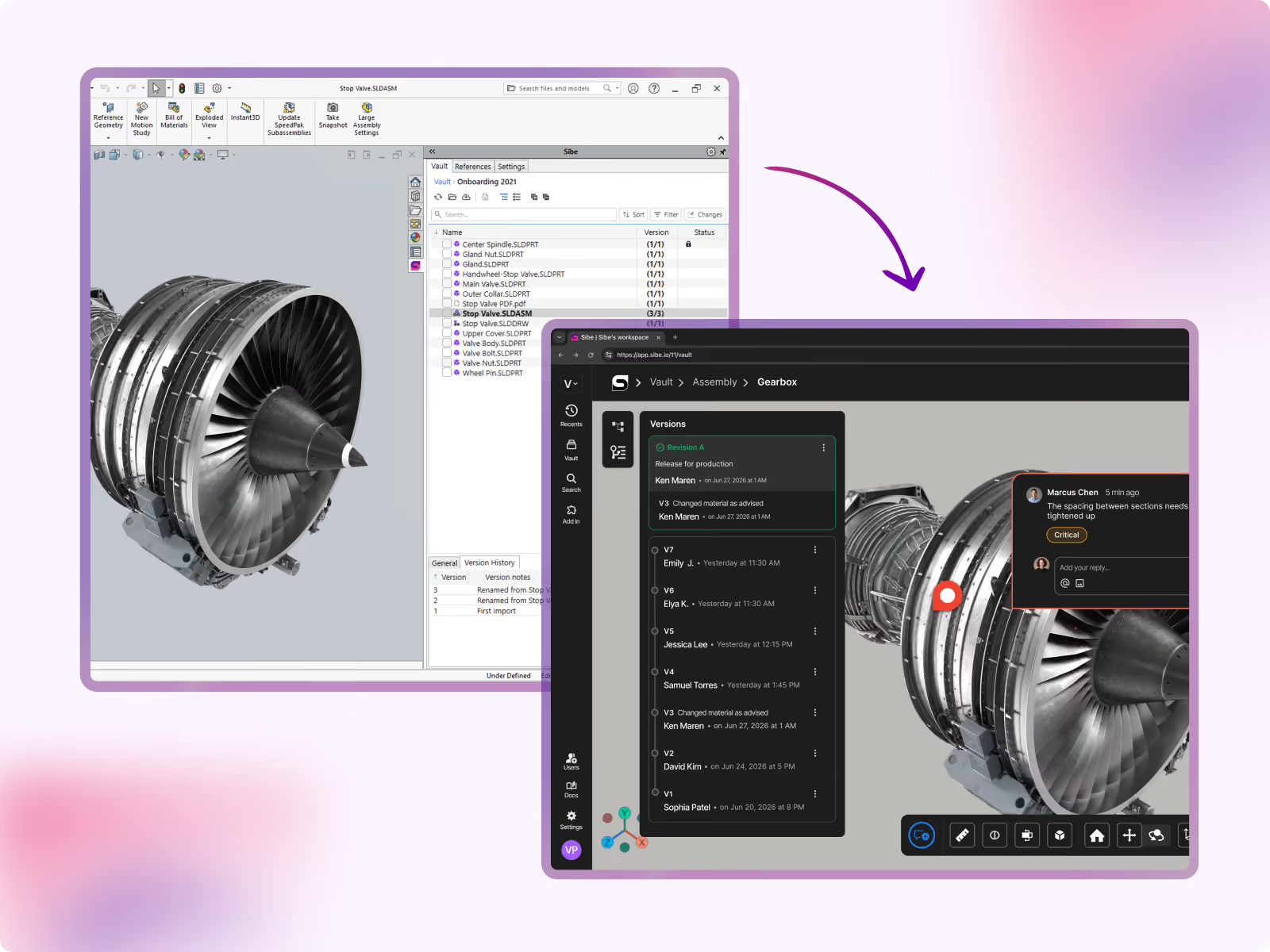
Version history you can trust
You can see who changed a file, when, and why, without opening it. Every check-in creates a version carrying the name, the timestamp and an optional change note, so you are not relying on file naming conventions or memory to reconstruct what happened.
If your team has ever hunted through v2, v3, and “approved” folders, you already know why this matters.
- Clear version timeline per file.
- Easy “what changed and when” visibility.
- Confident rollback to a previous version when needed.
Watch it happen live!
Prevent overwrites
When one engineer is editing a file, Sibe makes that obvious and prevents accidental overwrites. Sibe uses a check-out / check-in model so teams can work in parallel without losing work.
- One editor at a time when a file is checked out.
- Everyone else can still view the latest version.
- Clean reviews between designers and reviewers.

Built for distributed SolidWorks teams
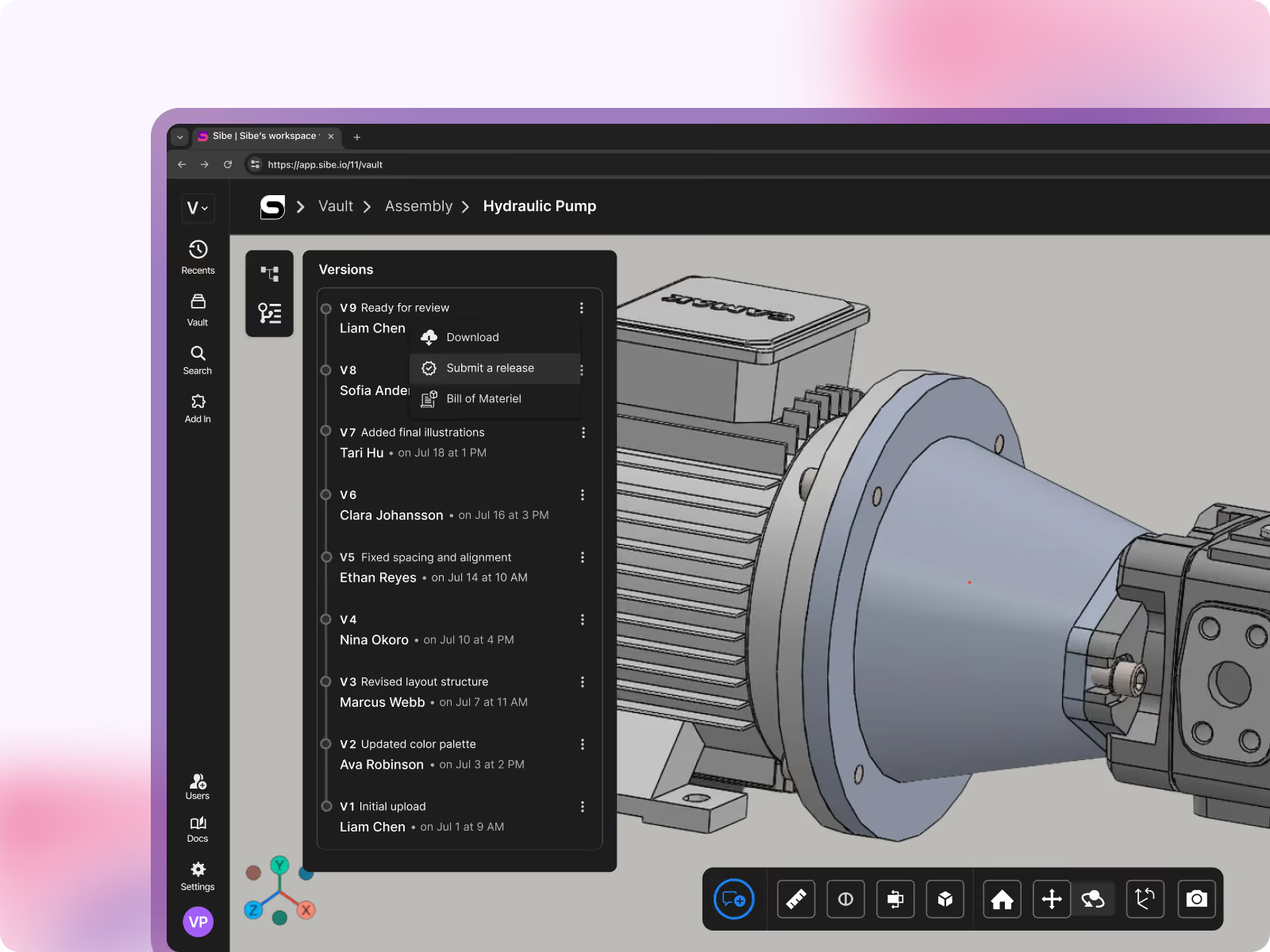

Release Control
You don’t need a complicated workflow diagram to stop revision mistakes. Sibe gives you lightweight release control so your team can mark what’s ready for review, what’s approved, and what’s released, without slowing engineering down.
- Simple statuses your team will actually use.
- Clear visibility into what’s safe to manufacture.
- An audit trail without extra admin work.
Share versions for non-CAD users easily
You can send a client or supplier the exact version they need to review, in a browser, without a license on their side or a file in their inbox. Share a link or QR code and their feedback stays tied to the version they saw.
Share a secure link for a file or assembly.
View in the browser (no SolidWorks license required for reviewers).
Feedback stays tied to the version that was reviewed.
Watch it happen live!
"We're remote. The designer is in Philadelphia, our CTO is in Miami, and I'm in Austin. We needed a way to design, review, and release without everyone sitting in the same place — or even in the same software."
Alberto Lopez
Chief Executive Officer,
Sunfish
"Our SolidWorks files carry structured product data that people outside the CAD team regularly need to access. Bridging that gap was essential for our global growth."

Dean Pascasio
CAD Engineering Lead,
Nordair Systems

Connect SolidWorks and start tracking versions in under 20 minutes
- Book a demo and start your free trial
- Install the connector as a standard SolidWorks add‑in
- Create your workspace and permissions
- Import a subset of files and start tracking versions immediately.
Frequently Asked Questions
What is Sibe?
How long does setup take?
Most teams connect SolidWorks and start tracking versions in under 20 minutes. The SolidWorks add-in is a 60 MB install that takes about three minutes, and there is no server, VPN, or IT configuration to manage.
Do we need IT involved to set it up?
No. The add-in installs like any other SolidWorks add-in, and everything else runs in the browser. There is no server to provision, no VPN, and no IT configuration. On the demo we run the setup end-to-end so you can see it before you commit.
Does Sibe require any software installation?
Yes. A lightweight SolidWorks add-in (~60 MB) installs in about three minutes and gives your engineers native check-in, check-out, and reference handling directly in SolidWorks. Everything else, including the web dashboard, file sharing, and visitor access, works entirely in the browser with nothing to install.
Can I try Sibe before switching from Kenesto?
Yes. Sibe offers a free 14-day trial with no credit card required. You can run Sibe alongside your current setup, import your real files, and evaluate the experience before making any commitment.
Does Sibe replace my folder structure?
Sibe mirrors your folder structure in a local cache folder, so it feels familiar to engineers working directly in SolidWorks. It is similar to your existing layout rather than identical, and most teams find it intuitive from day one.
How does Sibe handle assembly references?
Does Sibe work with file types other than SolidWorks?
Can non-engineers view our designs?
Yes. Sibe includes free unlimited web visitor access. Anyone with a link or QR code can view and measure your SolidWorks 3D models in the browser, with no SolidWorks or Sibe account required.
Can I share files with people outside my company?
Yes. Sibe lets you share files with external collaborators, suppliers, contractors, or manufacturing partners, with full control over what they can view. External users do not need a Sibe account to view shared files.
Is Sibe a direct replacement for Kenesto?
What happens to my files if I already use a shared drive or Dropbox?
Moving to Sibe is straightforward. You can upload your existing SolidWorks folder structure directly, and Sibe preserves your file hierarchy. There is no need to reorganize your data before you start.
How is version history managed in Sibe?
Is my CAD data secure in Sibe?
How is Sibe priced compared to Kenesto?
Enterprise-ready Security & Privacy
Everything in Sibe is designed to keep your work safe and secure.
Because your business is nobody else’s business.

SOC 2 Audited
Audited for Service Organization Controls (SOC 2 Type II) compliance.
Data Encryption & Backups
AES-256 encryption with daily backups and disaster recovery protocols.

Google Cloud Partner
Hosted on Google Cloud with data centers in Europe and the United States.
IP Protection Without Slowing Collaboration Down
Works for Everyone — Inside and Outside the Company
Sibe is designed for modern engineering teams, where the work doesn't stop at the company boundary. Whether you're co-developing with a partner, getting quotes from a supplier network, or walking a customer through a design review, the sharing experience is the same: fast, secure, and frictionless.
Internal engineers access the vault through the SolidWorks add-in or web app
External partners and customers access via browser link — no account required
No VPN. No IT ticket. No file sent over email.

