Reference Management via Native SolidWorks add-in
Redirecting...
- 14-day free trial
- No credit card required
- Quick setup in under 20 minutes
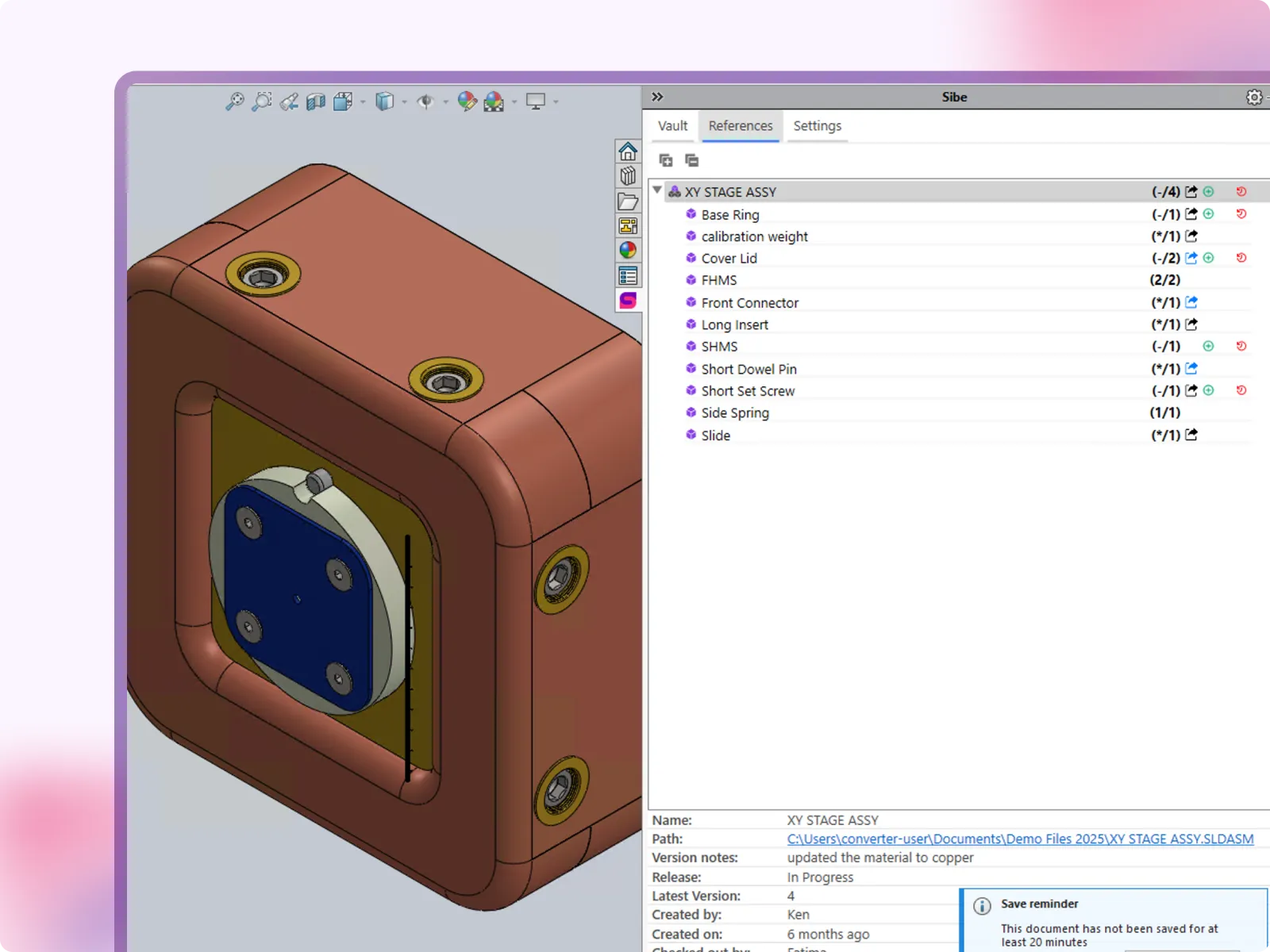
SolidWorks Reference Management Without Broken Assemblies
Moved or renamed files: assemblies start hunting for parts, and SolidWorks opens with missing components or asks you to browse for them.
Manual repair: re-pointing every reference by hand costs afternoons, and the problem comes back with the next folder cleanup.
Sibe handles references for you: cloud-based CAD Document Management & Collaboration purpose-built for SolidWorks teams.
- References update on move, rename, delete, and import
- Missing references found and repaired in bulk
- No servers, no VPNs, no admin hassles
Assembly reference handling, built for SolidWorks engineering teams
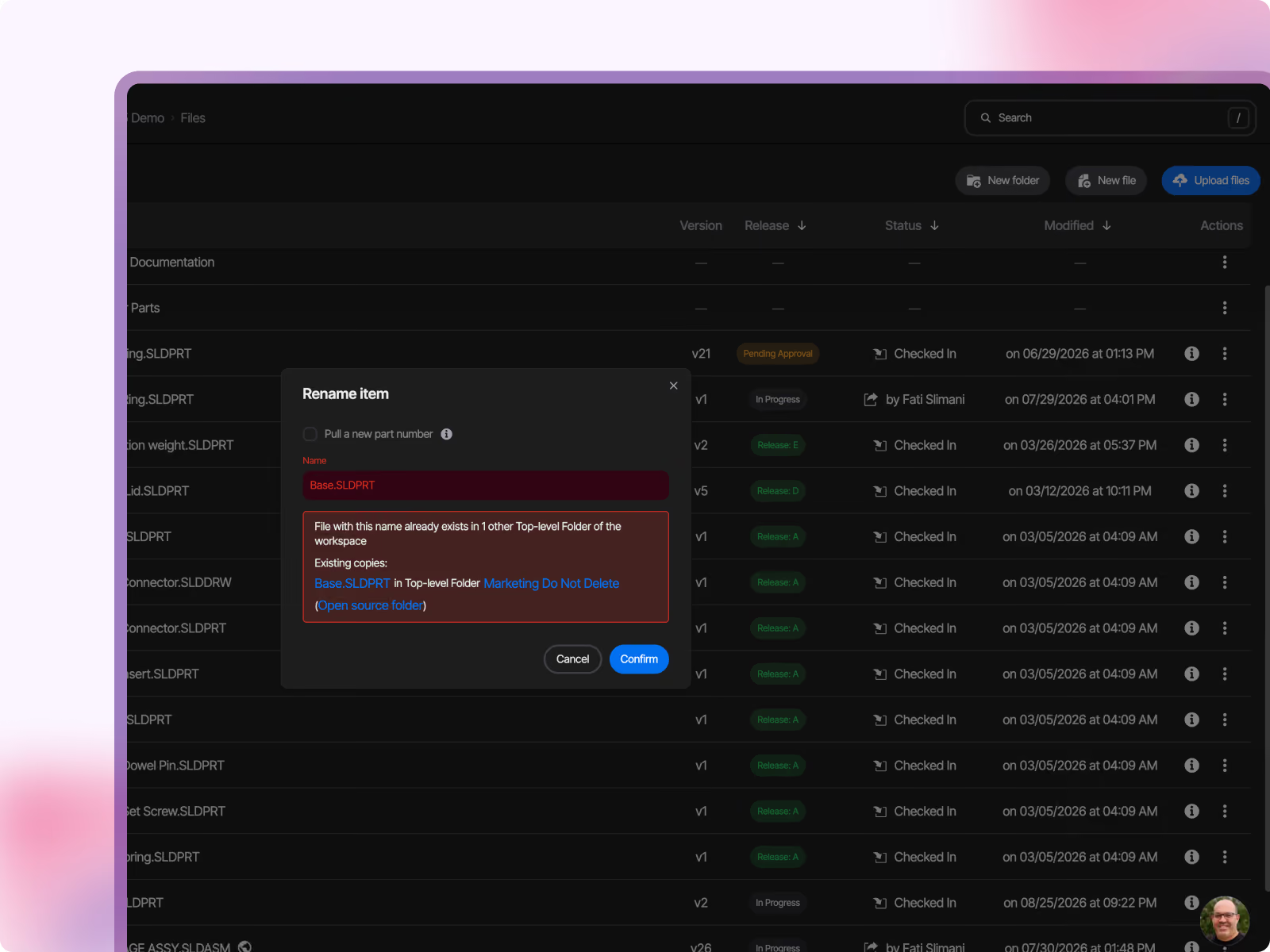
Move and rename files without breaking assemblies
You can restructure folders, rename parts to your numbering scheme, or archive old projects, and every assembly still opens with the right files. Sibe tracks file relationships in the vault and updates references automatically.
If your team has ever reopened an assembly full of suppressed components after a folder cleanup, you already know why this matters.
- References update on move, rename, delete, and import
- Drawings stay connected to their parts and assemblies
- Common parts shared by several assemblies, without duplication
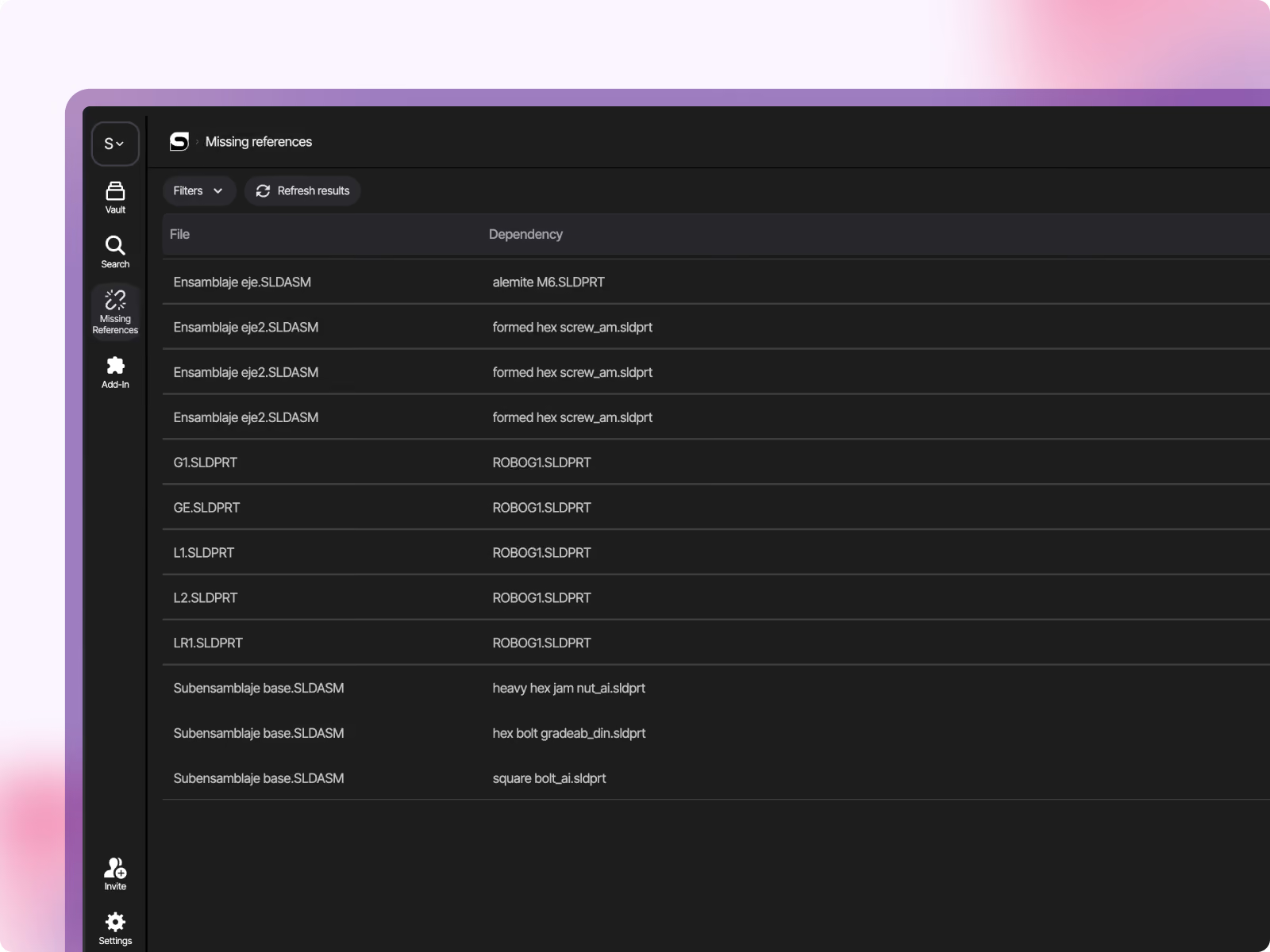
Repair missing references in bulk
You can see every unresolved reference in the vault on one page. The Missing References page lists each file that cannot find a dependency and suggests the fix; apply all suggestions in one pass and watch the count drop to zero. Upload a file that was missing, and Sibe repairs the references waiting for it automatically.
- Every unresolved reference listed in one place
- Apply all suggested fixes in one pass
- Uploading a missing file repairs its references automatically
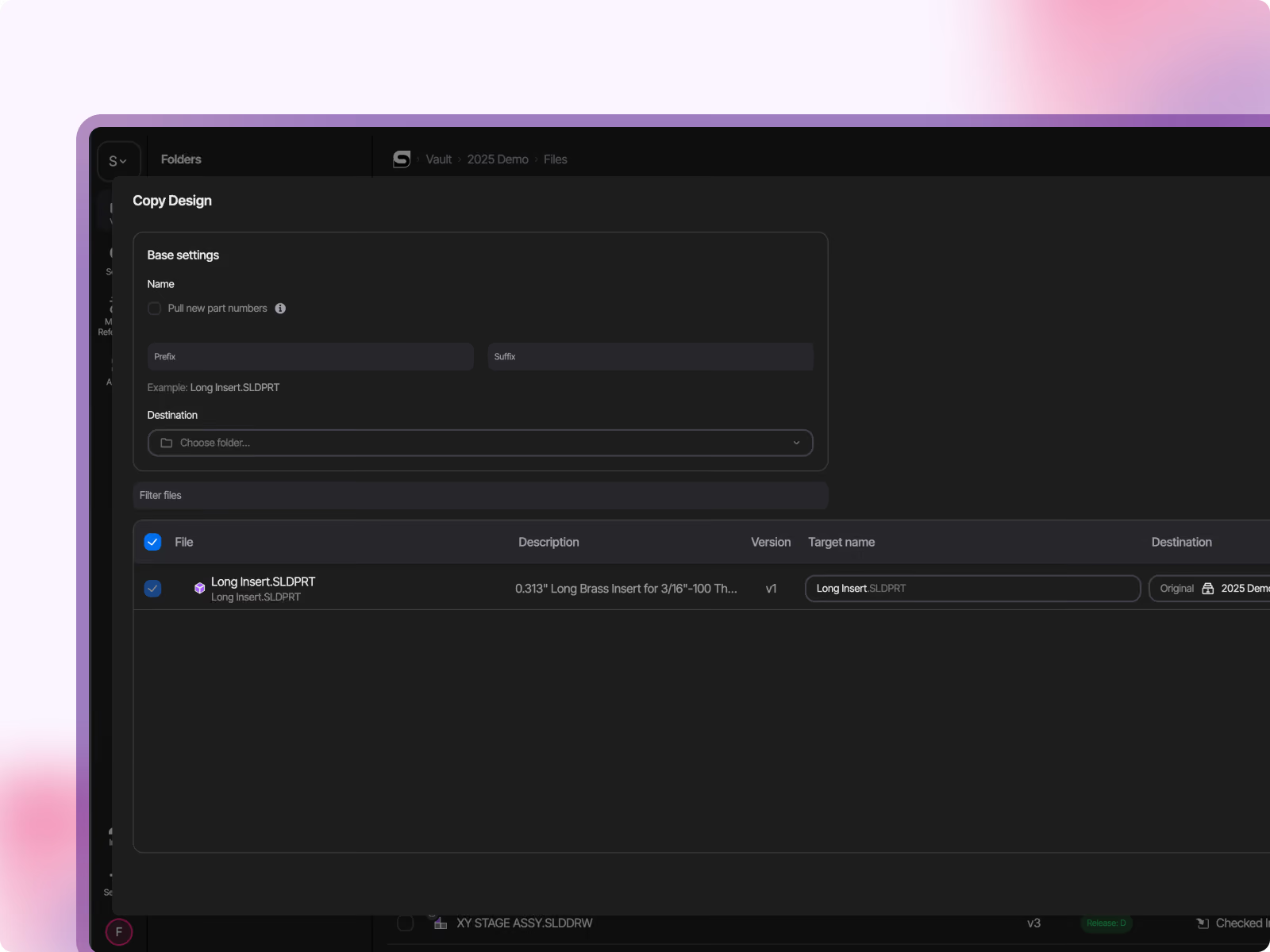
Copy assemblies without rewiring references
You can duplicate a whole assembly as the starting point for a new project, and the copy references the copied parts, not the originals. Copy Design resolves references automatically, includes associated drawings, and applies your prefix or suffix to every copied file.
- Copies reference the new files, originals stay untouched
- Associated drawings included in the copy
- Prefixes and suffixes applied to all copied files
Check references before anything breaks
You can open the References tab in the Sibe add-in and see what a file depends on before you move it. External references are detected and highlighted, so nothing surprises you after a reorganization.
External references detected and highlighted in the add-in
Drawings render with their referenced parts and assemblies
Unique file names enforced across the vault, so assemblies never grab the wrong file
IP Protection Without Slowing Collaboration Down
Works for Everyone — Inside and Outside the Company
Sibe is designed for modern engineering teams, where the work doesn't stop at the company boundary. Whether you're co-developing with a partner, getting quotes from a supplier network, or walking a customer through a design review, the sharing experience is the same: fast, secure, and frictionless.
Internal engineers access the vault through the SolidWorks add-in or web app
External partners and customers access via browser link — no account required
No VPN. No IT ticket. No file sent over email.
"We're remote. The designer is in Philadelphia, our CTO is in Miami, and I'm in Austin. We needed a way to design, review, and release without everyone sitting in the same place — or even in the same software."

Alberto Lopez
Chief Executive Officer,
Sunfish
"Our SolidWorks files carry structured product data that people outside the CAD team regularly need to access. Bridging that gap was essential for our global growth."

Dean Pascasio
CAD Engineering Lead,
Nordair Systems
Enterprise-ready Security & Privacy
Everything in Sibe is designed to keep your work safe and secure.
Because your business is nobody else’s business.

SOC 2 Audited
Audited for Service Organization Controls (SOC 2 Type II) compliance.

Data Encryption & Backups
AES-256 encryption with daily backups and disaster recovery protocols.

Google Cloud Partner
Hosted on Google Cloud with data centers in Europe and the United States.
Frequently Asked Questions
How fast can we get set up?
Connect SolidWorks and start with a single project in under 20 minutes, once the add-in is installed and a workspace is created. During the demo, we’ll show the setup end‑to‑end so you can see what it looks like in real life. Book a demo here.
Does Sibe work with our current SolidWorks version?
Sibe works with SolidWorks versions 2019 to 2026. The connector installs as a standard SolidWorks add-in. Setup takes under 20 minutes.
Do we need a server or VPN?
No server provisioning is required, and remote access does not depend on a VPN. That’s one of the main reasons teams prefer to use a cloud-based CAD Management solution instead of maintaining an on‑prem setup.
Can we run Sibe alongside a Traditional PDM during evaluation?
Yes, most engineers evaluate Sibe with a subset of files while continuing their current workflow for everything else. This reduces risk and makes it easy to compare day‑to‑day usability before switching anything fully.
What happens to our existing SolidWorks files and folder structure?
Import existing SolidWorks files into Sibe, and version tracking starts from that point. References are checked at import: assemblies keep their links to parts and drawings, and anything unresolved shows up on the Missing References page with a suggested fix.
Will moving/renaming files break assembly references?
No. Sibe tracks file relationships in the vault and updates references automatically when files are moved or renamed within Sibe, so assemblies keep opening with the right parts.
How do you prevent two engineers from overwriting each other's work?
Sibe uses a check-out / check-in approach, so when someone is editing a file, others cannot accidentally overwrite it. This reduces conflicts and removes the "who saved last?" risk.
Can non-CAD reviewers see the latest version?
Yes. Non-CAD teammates and clients can review in the browser, tied to a specific version, so feedback maps to the exact revision. This helps avoid approvals based on the wrong file export.
Is it secure enough for our IP?
Data is encrypted at rest and in transit, and access can be controlled at workspace/project/file level. Sharing links can be permission-scoped and revoked when needed.
What does it cost, and where can I see pricing?
Pricing is public and transparent: no quote-only gating. You can view plans here: https://www.sibe.io/pricing
What should we expect in a 20-minute demo?
A live walkthrough of reference handling in action: moving and renaming files, repairing missing references, and Copy Design, plus what setup looks like from scratch for your team.
Book a free Demo with Ken to see Sibe in action


Ken Maren
Chief Solutions Architect
SolidWorks Expert with 30+ Years Experience
Thank you for requesting a demo.
Our Customer Success team will be in touch within one business day to arrange a suitable time.
Alternatively, please select a time slot directly from the calendar below.
Thank you for your interest!
Our Customer Success team will get back to you within one business day to schedule the demo call.
.avif)