Web Analytics Made Easy - Statcounter

Looking for an Onshape PDM Alternative That Keeps Engineers in SolidWorks?

Onshape is its own CAD platform with built-in data management. If your team runs SolidWorks and you don't want to switch CAD, Sibe gives you a Cloud PDM with a native SolidWorks add-in, version control, assembly references, and browser-based collaboration without leaving SolidWorks you or your engineers already use.
‍
Drop your work email below — Try Sibe PDM 14 days for free, no credit card, no migration.

Redirecting...

Oops! Something went wrong while submitting the form.
  • No credit card required
  • 14-day free trial, no migration needed
  • Free onboarding with Ken, our SolidWorks expert with 30+ years experience
Sibe PDM has a five-star rating on both G2 and Capterra
based on reviews on
G2 logo highlighting Sibe PDM software for solidworks engineers reviews and ratings
and
Sibe PDM reviews on Capterra platform logo

Trusted by the world's top mechanical engineering teams

Baran Group logo — Israeli engineering and infrastructure firm using Sibe Cloud PDM for SolidWorksDynapower logo — energy storage and power conversion systems using Sibe Cloud PDM for SolidWorksEasyChar logo — UK biomass-to-energy technology provider using Sibe Cloud PDM for SolidWorksUrschel Laboratories logo — industrial food cutting machine maker using Sibe Cloud PDM for SolidWorksJohn King Chains logo — UK industrial conveyor chain manufacturer using Sibe Cloud PDM for SolidWorksNordair Systems logo — German modular cleanroom manufacturer using Sibe Cloud PDM for SolidWorksQuantum Machines logo — quantum computing control systems maker using Sibe Cloud PDM for SolidWorksInternational Plastics logo — flexible plastic packaging manufacturer using Sibe Cloud PDM for SolidWorksAutovol logo — automated volumetric modular construction factory using Sibe Cloud PDM for SolidWorksPrefab Logic logo — modular construction consultancy using Sibe Cloud PDM for SolidWorks

The only cloud PDM with a native Add-in
for SolidWorks that doesn't break the bank

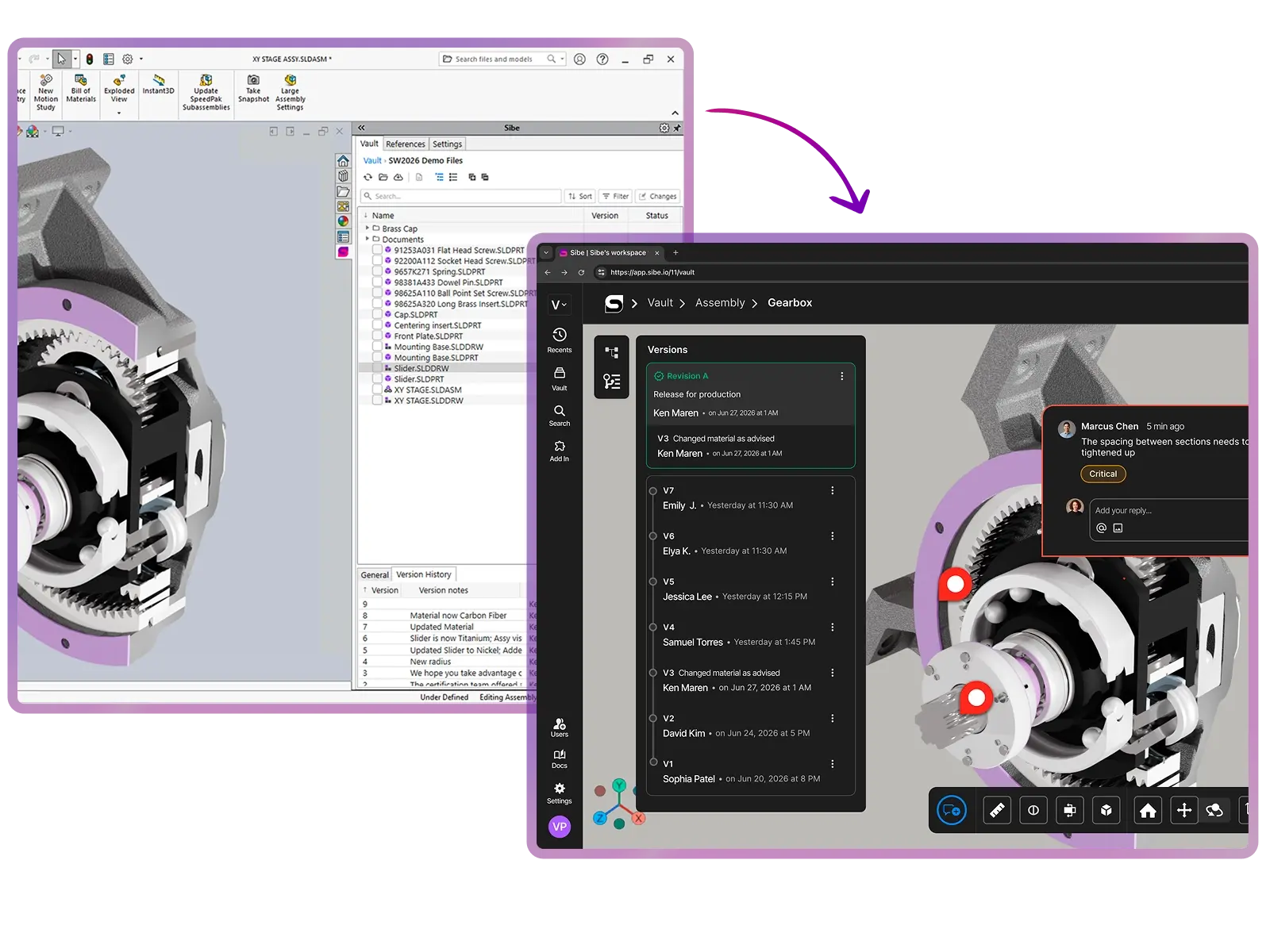
Sibe is purpose-built for SolidWorks teams. Install the add-in, connect your folder, and start checking files in and out directly in SolidWorks — Sibe tracks every version, every reference, every revision in the background. No CAD switch. No migration. No server. Live in 30 minutes.
Cloud-Based By Design

No Infrastructure. No Migration. Live in 30 Minutes.

Cloud-based by design — focus on the engineering, not the setup.

  • No servers to host, no upgrades to schedule.
  • No migration — use your existing SolidWorks files as-is.
  • Install the add-in, connect your folder, invite your team — live in 30 minutes.
Version Control & History

Check Files In and Out Directly in SolidWorks. Sibe Tracks Every Version.

Engineers stay in SolidWorks. Sibe handles the version control behind the scenes — no accidental overwrites, no lost work.

  • Check in and check out parts, sub-assemblies, and drawings directly in SolidWorks, even offline.
  • When a file is checked out, everyone else sees it's locked for editing.
  • Full version history by file, by teammate, by date — every change tracked automatically.
Change Workflows & Revisions

Track Every Change. Release Revisions When Ready.

Turn engineering changes into tracked work. When a revision is approved, Sibe locks the release for manufacturing.

  • Pin change requests and decisions to individual parts and sub-assemblies.
  • Track design changes across versions, and create revisions on approval.
  • Customise your workflow — Sibe PDM keeps a full history of every change and decision.
External Sharing & Collaboration

Share IP-protected designs with non-CAD partners. Free for viewers.

Share 3D models and 2D drawings with clients, suppliers, and non-CAD teammates. Unlimited free web visitors on every plan — no extra licences, no per-seat fees for reviewers.

  • Share full projects, specific versions, or individual revisions.
  • Control roles, permissions, and download access for external collaborators.
  • Send a free public link or QR code — reviewers open files in any browser, no SolidWorks, no Sibe account.
  • Protect your IP — no STEP exports, no screenshots, no email attachments.

‍

A clear side-by-side

Sibe PDM vs. OnShape For SolidWorks

Sibe and Onshape — Two Different Approaches

Features
OnShape
CAD tool
Onshape's own browser-based CAD environment
Works with your existing SolidWorks via native add-in
Best fit
Teams ready to move their CAD work into Onshape's platform
SolidWorks teams who want Cloud PDM without switching CAD
In-browser collaboration & external sharing
Co-editing inside Onshape's CAD environment. External sharing supported via Onshape accounts and viewer roles.
Share files via free public link or QR code. Reviewers open files in any browser.
Native SolidWorks add-in
Not applicable — Onshape replaces SolidWorks
Native check-in / check-out directly in SolidWorks
Assembly reference handling
Handled inside Onshape's data model
SolidWorks reference tracking: parts, sub-assemblies, drawings stay linked
Existing SolidWorks files
Imported into Onshape's format
Use them as-is: no migration, no conversion
External viewers and reviewers
Viewer licences are included with paid plans
Unlimited free web visitors on all Sibe plans
Pricing (per user, annual)
From $1,500/year
Check Onshape's Website for current pricing
From $42/member/month - $500/year
Setup time
Depends on CAD migration scope
Live in 30 minutes — install add-in, connect folder, invite team
Servers and VPN
None required
None required
Hosting and security
Cloud-hosted by PTC (Onshape's parent company)
Google Cloud, SOC 2 Type II audited

Why SolidWorks Teams Love Sibe PDM

Why SolidWorks Teams Choose Sibe Over Onshape

Most teams looking at Onshape have already invested years in SolidWorks — the licences, the part libraries, the engineer expertise. Switching CAD means retraining, file conversion, and rebuilding muscle memory. Sibe gives you the cloud-based collaboration and version control you wanted from Onshape, while keeping every SolidWorks file, library, and workflow you already have.

  • Keep SolidWorks, gain Cloud PDM — no CAD switch.
  • Native SolidWorks add-in — check files in and out directly in SolidWorks.
  • Free unlimited web visitors — sales, suppliers, and clients view files at no extra cost.
  • 30-minute setup with no servers, no VPN, no migration.
  • Free onboarding with Ken, our SolidWorks expert with 30+ years experience.

Book a free Demo with Ken to see Sibe PDM in action

Watch Ken explain Sibe PDM
Ken Maren, SolidWorks PDM Admin with 30+ years experience, Chief Solutions Architect at Sibe, ready to demo Sibe PDM
PLAY VIDEO
Ken Maren, SolidWorks PDM Admin with 30+ years experience, Chief Solutions Architect at Sibe, ready to demo Sibe PDM

Ken Maren

Chief Solutions Architect

SolidWorks Expert with 30+ Years Experience

Thank you for your interest!
Our Customer Success team will get back to you within one business day to schedule the demo call.
Oops! Something went wrong while submitting the form. Please try again!

Transparent pricing that doesn't break the bank, with free unlimited web visitors included in all plans

Free Trial

$0
Free for 14 days

  • Unlimited members
  • Unlimited web visitors
  • SolidWorks native Add-in
  • Unlimited cloud storage
  • Version & Revision Control
  • 2D & 3D Collaboration
  • Live Chat & Email Support
  • Personalized Onboarding

Business

$42/member/month
(when billed annually)

  • Price per member
  • Unlimited web visitors
  • SolidWorks native Add-in
  • 50 GB shared storage per member
  • Version & Revision Control
  • 2D & 3D Collaboration
  • Live Chat & Email Support
  • Personalized Onboarding

Business Plus

$50/member/month
(when billed annually)

  • Price per member
  • Unlimited web visitors
  • SolidWorks native Add-in
  • 500 GB shared storage per member
  • Version & Revision Control
  • 2D & 3D Collaboration
  • Live Chat & Email Support
  • Priority Support
  • Personalized Onboarding

14-day free premium trial, no credit card required. Month-to-month plans also available.
Free onboarding call with Ken, our SolidWorks Expert with 30+ years experience, included in all plans.

Redirecting...

Oops! Something went wrong while submitting the form.

"Sibe has the same functionality as Vault PDM, but without the excessive cost of servers and data migration."


Tomasso Vitale, Engineering Manager at Hirata Corporation of America, testimonial about Sibe

Tomasso Vitale

Engineering Manager,
Hirata Corporation of America

"I’m very impressed with Sibe.io - their R&D team came up with a new approach to managing CAD design data that is simple and cost-effective."


Profile photo of Salimzhan Gafurov, who shared a testimonial about Sibe.io's CAD data management approach

Salimzhan Gafurov

Director of Advanced Research & Technology,
Verne

Enterprise-ready Security & Privacy

Everything in Sibe is designed to keep your work safe and secure.
Because your business is nobody else’s business.

SOC 2 Audited

Audited for Service Organization Controls (SOC 2 Type II) compliance.
Data Encryption & Backups

AES-256 encryption with daily backups and disaster recovery protocols.

Google Cloud Partner

Hosted on Google Cloud with data centers in Europe and the United States.

Frequently Asked Questions

Sibe tracks versions of your SolidWorks parts, assemblies, and drawings so it’s clear what changed, who changed it, and which revision is current. You don’t have to rely on file renaming or “latest folder” conventions to manage releases.

Most teams are either on shared folders (risky for revisions and hard to manage) or on on‑premise PDM (high implementation and maintenance overheads). Sibe is cloud PDM built for SolidWorks—aimed at giving you control without the infrastructure burden.

Typically, you can connect SolidWorks and start with a single project quickly (often within 30 minutes) once the add‑in is installed and a workspace is created. During the demo, we’ll show the setup end‑to‑end so you can see what it looks like in real life. Book a demo here.

Sibe supports SolidWorks 2018 through 2026. The connector installs as a standard SolidWorks add‑in, so it’s designed to be straightforward to deploy.

No server provisioning is required, and remote access does not depend on a VPN. That’s one of the main reasons teams use cloud PDM instead of maintaining an on‑prem setup.

Yes, most engineers evaluate Sibe PDM with a subset of files while continuing their current workflow for everything else. This reduces risk and makes it easy to compare day‑to‑day usability before switching anything fully.

Your existing SolidWorks files can be imported into Sibe, and version tracking starts from that point forward. Assemblies that reference parts and drawings are preserved as part of the import so you don’t lose relationships.

SolidWorks references are fragile in shared folders because they depend on file paths. Sibe tracks file relationships inside the vault so the system can keep references intact when files are managed within Sibe.

Sibe uses a check‑out/check‑in approach so when someone is editing a file, others can’t accidentally overwrite it. This reduces conflicts and removes the “who saved last?” risk.

Yes—non‑CAD teammates (and clients) can review via the browser, tied to a specific version, so feedback maps to the exact revision. This helps avoid approvals based on the wrong file export.

Data is encrypted at rest and in transit, and access can be controlled at workspace/project/file level. Sharing links can be permission-scoped and revoked when needed.

Pricing is public and transparent—no “quote-only” gating. You can view plans here: https://www.sibe.io/pricing

A live walkthrough of version control in action (versions, history, collaboration controls, and sharing), plus what setup looks like from scratch for your team.

Book a demo here
​

If you want a quick explainer page first, use: https://www.sibe.io/cloud-based-pdm

Try Sibe PDM - Fall in love with SolidWorks again

No servers, no admin or VPN hassles, no initial migration required. With free unlimited web visitors.

Redirecting...

Oops! Something went wrong while submitting the form.

Free onboarding call with Ken, our SolidWorks Expert, included in all plans.

Sibe PDM has a five-star rating on both G2 and Capterra
based on reviews on
G2 logo highlighting Sibe PDM software for solidworks engineers reviews and ratings
and
Sibe PDM reviews on Capterra platform logo