Web Analytics Made Easy - Statcounter
Top-Rated Engineering Collaboration Platform
4.9
​

Manage SolidWorks BOM in a Simple Spreadsheet-like Interface

Redirecting...

Oops! Something went wrong while submitting the form.
  • 14-day free trial
  • No credit card required
  • Quick setup in under 20 minutes
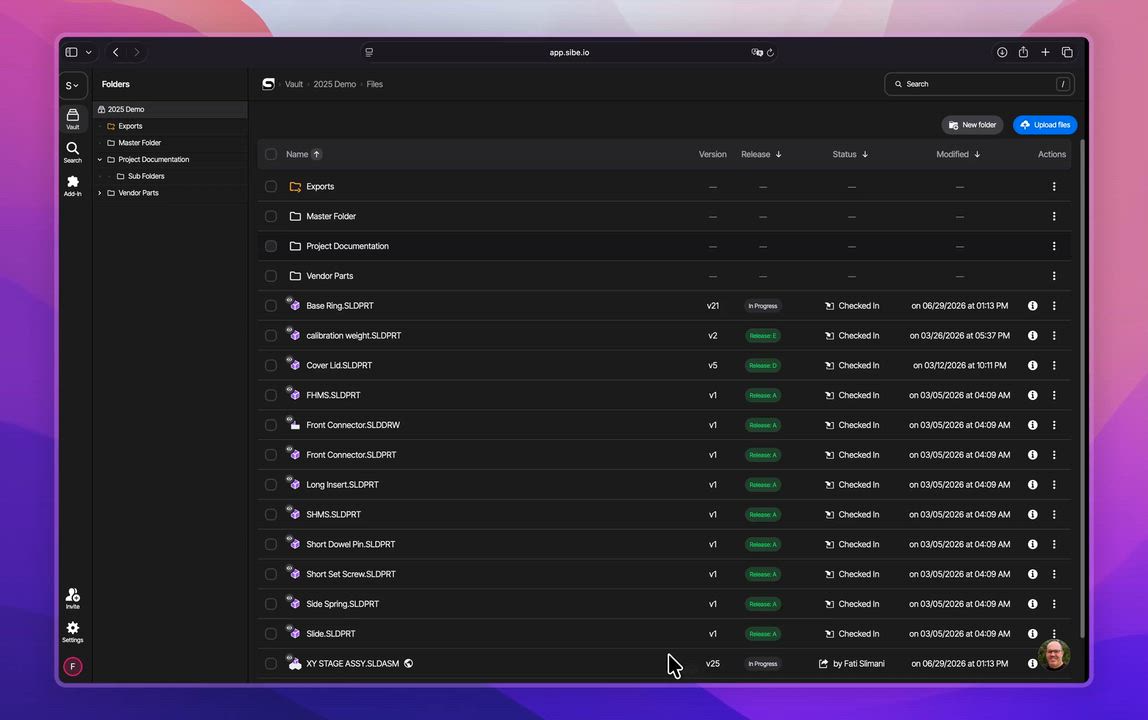
Indented BOM built from a SolidWorks assembly in the Sibe Web Dashboard
Watch how you build a BOM from a SolidWorks assembly — in 10 seconds
That's it — your BOM, straight from the assembly you already modeled in SolidWorks.
Sibe has a five-star rating on both G2 and Capterra

based on reviews on

and

Trusted by the world's top mechanical engineering teams

Baran Group logo — engineering and infrastructure firm using Sibe for SolidWorksDynapower logo — energy storage and power conversion systems using Sibe for SolidWorksEasyChar logo — UK biomass-to-energy technology provider using Sibe for SolidWorksUrschel Laboratories logo — industrial food cutting machine maker using Sibe for SolidWorksRaccoon Lab logo: engineering team using Sibe for SolidWorksJohn King Chains logo — UK industrial conveyor chain manufacturer using Sibe for SolidWorksNordair Systems logo — German modular cleanroom manufacturer using Sibe for SolidWorksQuantum Machines logo — quantum computing control systems maker using Sibe for SolidWorksInternational Plastics logo — flexible plastic packaging manufacturer using Sibe for SolidWorksAutovol logo — automated volumetric modular construction factory using Sibe for SolidWorksPrefab Logic logo — modular construction consultancy using Sibe for SolidWorks
Baran Group logo — engineering and infrastructure firm using Sibe for SolidWorksDynapower logo — energy storage and power conversion systems using Sibe for SolidWorksEasyChar logo — UK biomass-to-energy technology provider using Sibe for SolidWorksUrschel Laboratories logo — industrial food cutting machine maker using Sibe for SolidWorksRaccoon Lab logo: engineering team using Sibe for SolidWorksGeneral logo: industrial equipment manufacturer using Sibe for SolidWorksJohn King Chains logo — UK industrial conveyor chain manufacturer using Sibe for SolidWorksNordair Systems logo — German modular cleanroom manufacturer using Sibe for SolidWorksQuantum Machines logo — quantum computing control systems maker using Sibe for SolidWorksInternational Plastics logo — flexible plastic packaging manufacturer using Sibe for SolidWorksAutovol logo — automated volumetric modular construction factory using Sibe for SolidWorksPrefab Logic logo — modular construction consultancy using Sibe for SolidWorks

BOM Management for SolidWorks engineering teams
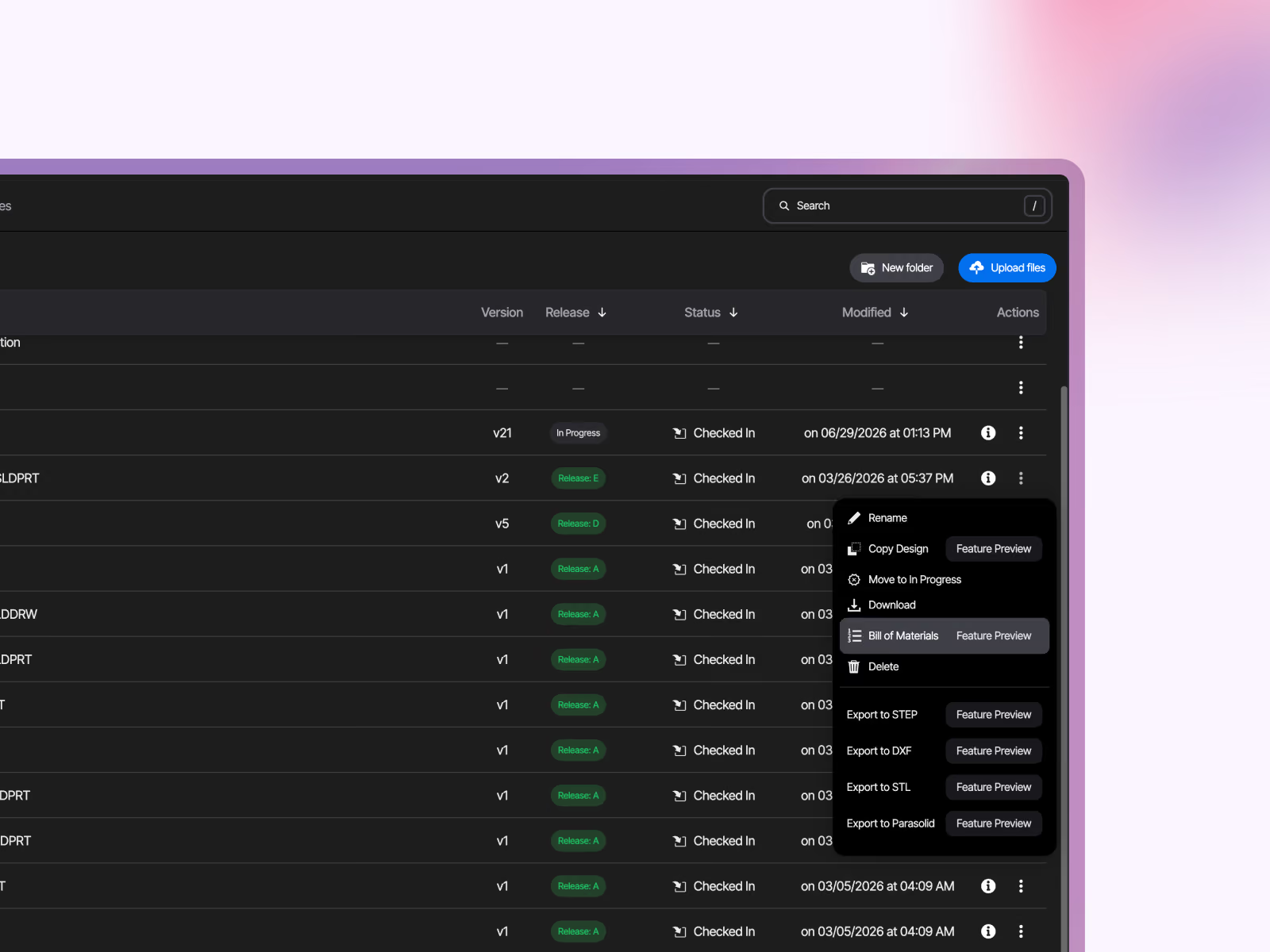
Open BOM: Opening a Bill of Materials from the file actions menu in the Sibe Web Dashboard

Skip the spreadsheet. Keep the BOM

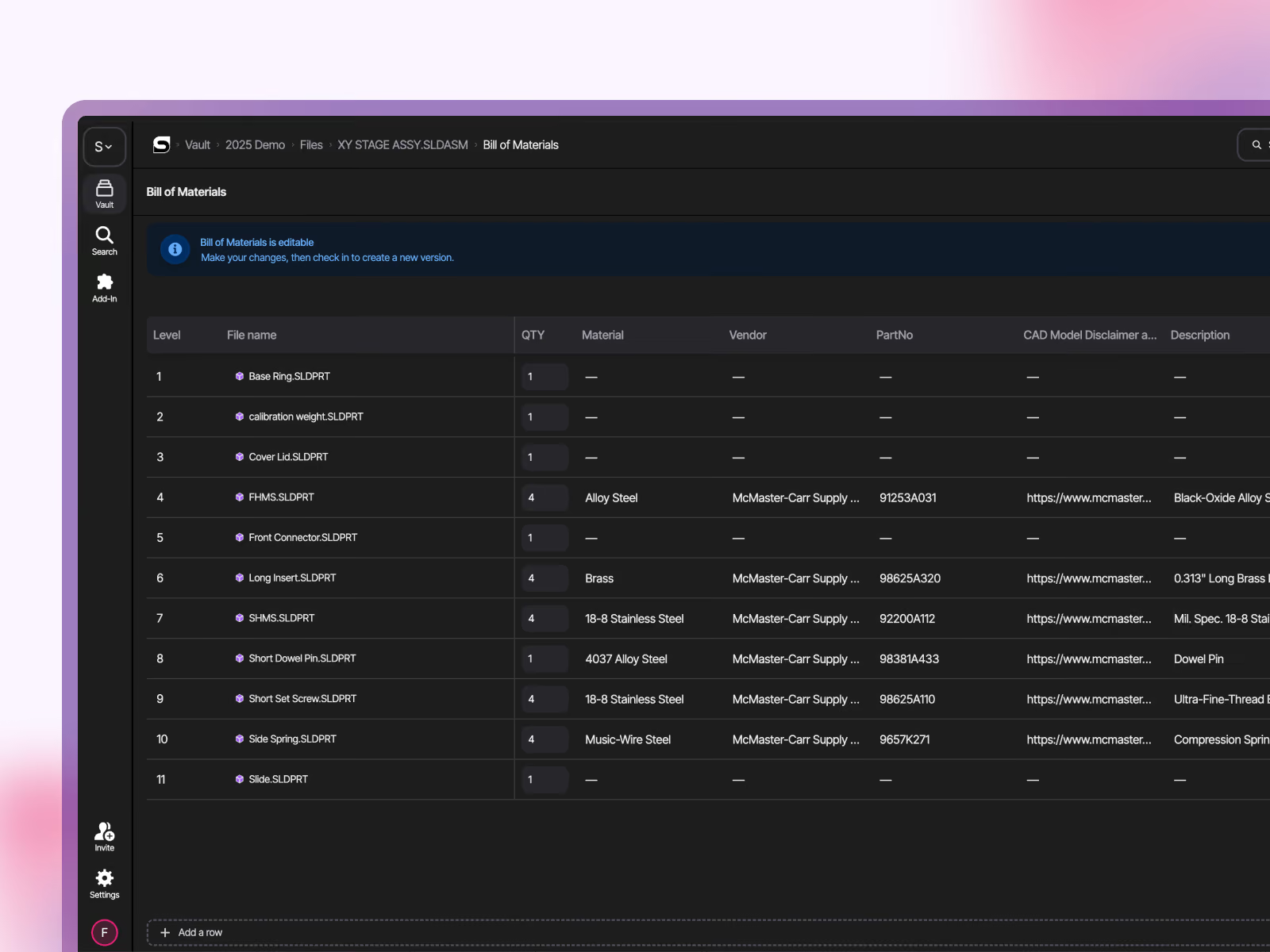
Check in your assembly directly in SolidWorks. Sibe reads the references and builds an indented BOM in the Web Dashboard, subassemblies, parts, and quantities included. Check in a new version and the BOM updates with it. The parts list matches what your team last checked in.

No drawing created just to place a BOM table. No copy-paste into Excel. No separate BOM tool to keep in sync.

Book a demo
​
Try Sibe for Free

See your own custom properties

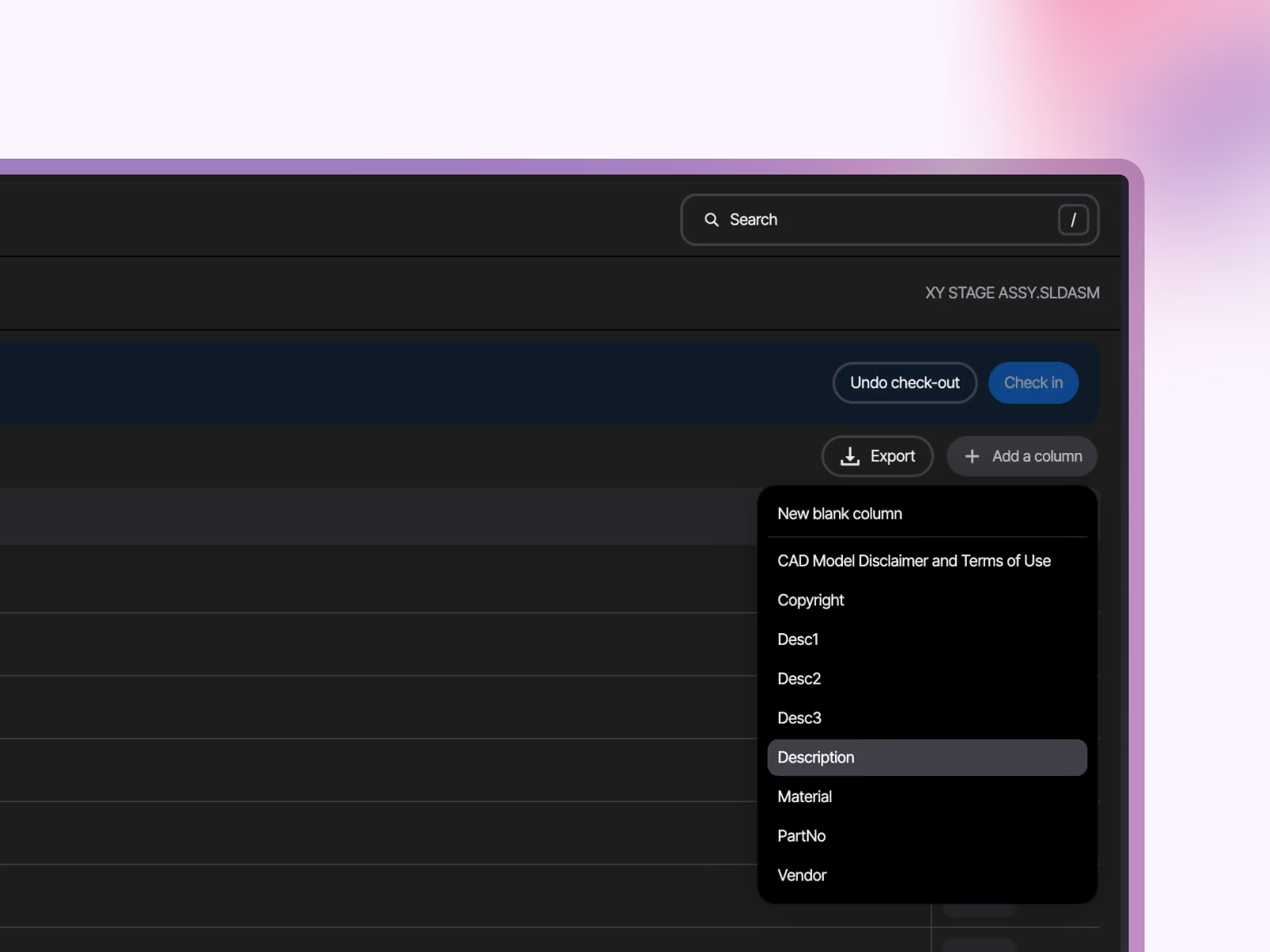
Your BOM starts with two columns filled in for you: Filename and QTY, quantities counted from the assembly's references, so you never tally parts by hand. Pull in the properties you already maintain in SolidWorks: part numbers, materials, descriptions, finishes. Track something outside SolidWorks? Add a blank column and fill it in.
Book a demo
​
Try Sibe for Free
Adding BOM columns from SolidWorks custom properties in Sibe
Indented BOM built from a SolidWorks assembly in the Sibe Web Dashboard

Capture everything that ships, not just what you model

Check out the BOM and make it complete. Add rows for packaging, fasteners, adhesives, grease, the items that never appear in your feature tree. Adjust quantities. Check it back in when you're done, or use Undo Check-Out to discard edits. No accidental overwrites, your BOM edits follow the same check-out rule as your CAD files.

Book a demo
​
Try Sibe for Free

Export for purchasing, quoting, and production

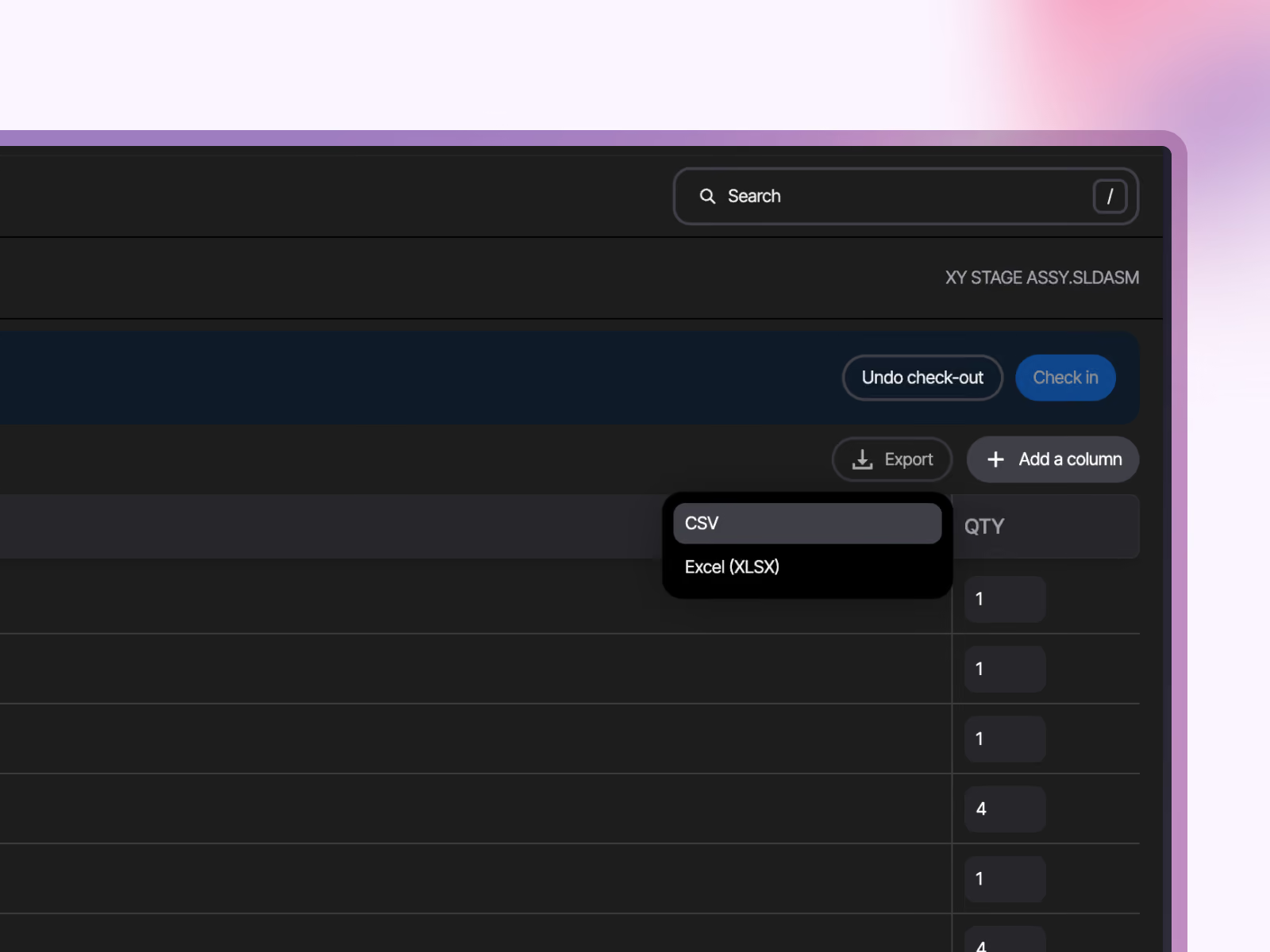
Export your BOM to Excel (XLSX) or CSV straight from the Web Dashboard. Send it to purchasing, attach it to a quote, or load the CSV into your ERP yourself.

Your whole team works from the same list. Purchasing and project managers read the BOM without touching SolidWorks.
Book a demo
​
Try Sibe for Free
Exporting a SolidWorks BOM to Excel (XLSX) or CSV from the Sibe Web Dashboard
"We're remote. The designer is in Philadelphia, our CTO is in Miami, and I'm in Austin. We needed a way to design, review, and release without everyone sitting in the same place — or even in the same software."

Alberto Lopez - Sunfish CEO

Alberto Lopez

Chief Executive Officer,
Sunfish

"Our SolidWorks files carry structured product data that people outside the CAD team regularly need to access. Bridging that gap was essential for our global growth."
Dean CEO of Engineering Company NordAir

Dean Pascasio

CAD Engineering Lead,
Nordair Systems

Enterprise-ready Security & Privacy

Everything in Sibe is designed to keep your work safe and secure.
Because your business is nobody else’s business.

Badge for SOC 2 audit confirming Sibe adherence to data security and protection standards

SOC 2 Audited

Audited for Service Organization Controls (SOC 2 Type II) compliance.

Sibe has AES-256 encryption with daily backups and disaster recovery

Data Encryption & Backups

AES-256 encryption with daily backups and disaster recovery protocols.

Google Cloud Partner logo — Sibe is a verified partner using Google's enterprise-grade, secure cloud storage

Google Cloud Partner

Hosted on Google Cloud with data centers in Europe and the United States.

Frequently Asked Questions

How do I generate a BOM from a SolidWorks assembly?

Check in your assembly directly in SolidWorks, Sibe reads its references and builds an indented BOM automatically in the Web Dashboard. Each new version you check in refreshes the BOM data, so your parts list stays in step with the CAD. The current release builds the BOM from the assembly's Default Configuration.

Do I need to set up custom properties before BOMs work?

No. Every BOM starts with Filename and QTY columns out of the box. When you want more, map columns to your SolidWorks custom properties — part number, material, description — or add a blank column and fill it in directly.

Can I add items that aren't modeled in SolidWorks?

Yes. Check out the BOM, add rows for items like packaging, fasteners, or adhesives, and edit quantities where needed. Check the BOM back in to save, or use Undo Check-Out to discard the edits.

What export formats does Sibe support?

CSV and Excel (XLSX), exported directly from the Web Dashboard.

Which plans and seats include BOMs?

BOMs are available on the Business Plus plan. Editors and Contributors can generate, view, edit, and export BOMs; Viewers can view them. All BOM work happens in the Web Dashboard.

Book a free Demo with Ken to see Sibe in action

Book a Live Demo with our product Expert
Ken Maren, Chief Solutions Architect at Sibe and engineering collaboration expert with 30+ years of experience, ready to demonstrate how modern CAD document management streamlines design reviews, revision control, and team collaboration.

Ken Maren

Chief Solutions Architect

SolidWorks Expert with 30+ Years Experience

Thank you for your interest!
Our Customer Success team will get back to you within one business day to schedule the demo call.
Oops! Something went wrong while submitting the form. Please try again!