Remote Team Collaboration for SolidWorks Teams without Servers or VPN
Redirecting...
- No prep needed. We’ll show version control running live on real SolidWorks files.
- Works alongside your current process while you evaluate your PDM.
One place for your SolidWorks files, your team, and your partners
- One live version of every SolidWorks file, accessible to everyone who needs it
- Engineers always aware of who is working on what
- External partners viewing the latest 3D design, not a static export
- Remote team members connected to the vault from anywhere
No servers. No VPNs. No friction.
How Sibe Powers Remote Collaboration
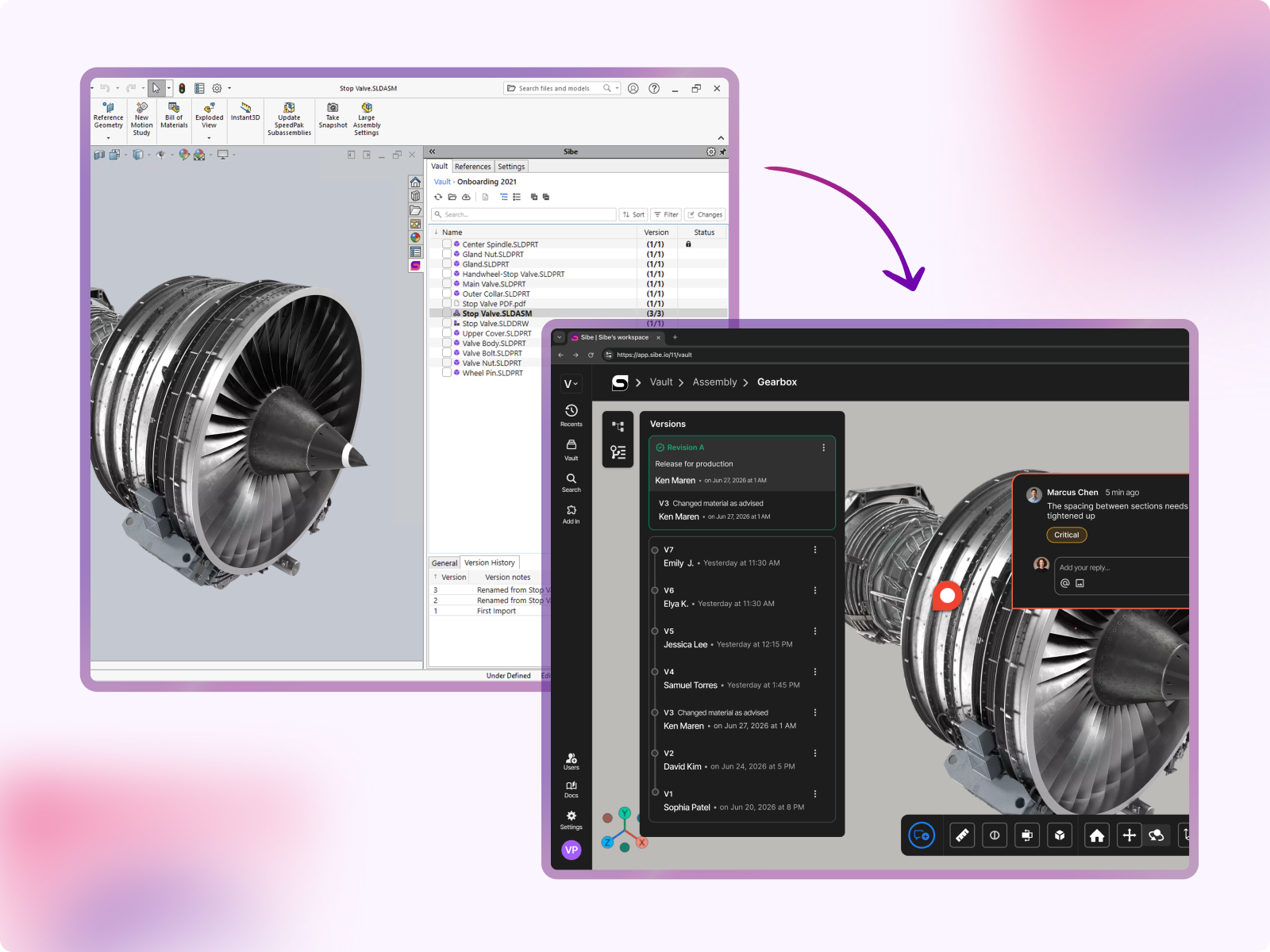
One Version. Every Team Member. Every Location.
Every engineer on your team, whether in the office, at home, or at a supplier's facility, always opens the current, approved version of every file. Sibe's native SolidWorks add-in connects directly to the cloud vault, so checking files in and out happens without leaving SolidWorks. Even offline work is supported, with automatic sync when the connection is restored.
Clean, Conflict-Free Editing
When an engineer checks a file out for editing, Sibe locks it automatically. The rest of the team sees the lock status in real time and can view the latest version in read-only mode. Once the engineer checks the file back in, the updated version is immediately available to everyone with a full record of what changed and when.
Every edit is clean. Every version is intentional.


Share Designs With Anyone
Share any SolidWorks file, assembly, or drawing with external partners, suppliers, contract manufacturers, clients, or regulators, via a simple link or even with a QR code.
External viewers can view and rotate your design. Every collaborator can mark up designs directly in their browser. No SolidWorks license required. No Sibe account required. Free for unlimited viewers.
You decide exactly what each collaborator can view, download, or edit, and you can update or revoke access at any time.
Files shared externally always reflect the latest checked-in version, so partners are never working from something outdated.
Markup & Feedback on the Actual Design
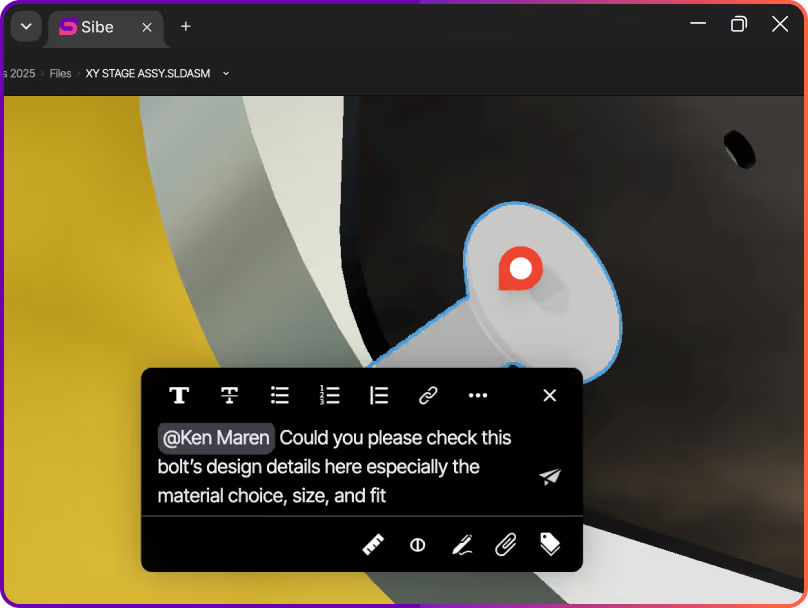
Design reviews happen directly on the model. Your team can add comments, annotations, and markups on 3D models and 2D drawings in the browser attached to the exact version they reference.
Decisions stay connected to the design. Nothing gets lost between inboxes.

Tasks Connected to Parts and Assemblies
Sibe lets you create and assign tasks directly against individual parts or subassemblies linked to the specific checked-in version they relate to. Your remote team always knows what needs doing, who owns it, and where things stand, all within the same workspace as your files.
Multiple Engineers. One Project. No Conflicts
Watch it happen live!

Built for Security at Every Level with AES-256 encryption
Every file in Sibe is protected with AES-256 encryption in transit and at rest, hosted on Google Cloud infrastructure. Sibe is SOC 2 Type II audited, with daily backups and disaster recovery built in so your product data stays protected wherever your team is working from.
"We're remote. The designer is in Philadelphia, our CTO is in Miami, and I'm in Austin. We needed a way to design, review, and release without everyone sitting in the same place — or even in the same software."

Alberto Lopez
Chief Executive Officer,
Sunfish
"Our SolidWorks files carry structured product data that people outside the CAD team regularly need to access. Bridging that gap was essential for our global growth."

Dean Pascasio
CAD Engineering Lead,
Nordair Systems
Frequently Asked Questions
Do remote team members need to install anything?
Engineers working directly in SolidWorks install the Sibe add-in, which takes under five minutes. All other collaborators, reviewers, managers, suppliers, and clients access and view designs in their browser with nothing to install.
Does Sibe require a VPN?
No. Sibe is fully cloud-native. Remote team members connect securely over the internet from any location, on any device.
Can I share files with someone who doesn't have a SolidWorks license?
Yes. External collaborators can view, rotate, and mark up 3D models and 2D drawings in their browser for free, with no Sibe account or SolidWorks license needed.
What happens when an engineer works offline?
The Sibe SolidWorks add-in supports offline working. Files sync automatically and are ready to check back in when the connection is restored.
Is there a limit on how many external viewers I can invite?
No. Sibe offers unlimited free viewers, so you can share designs with as many suppliers, clients, or stakeholders as your project requires.
How does check-in and check-out work in practice?
When an engineer is ready to work on a file, they check it out directly from within SolidWorks using the Sibe add-in. The file is locked for their exclusive use while they work. When they are finished, they check it back in, the new version is immediately available to the rest of the team, with a full record of what changed.
Can non-CAD stakeholders review the latest version?
Yes—non‑CAD teammates (and clients) can review via the browser, tied to a specific version, so feedback maps to the exact revision. This helps avoid approvals based on the wrong file export.
Is it secure enough for our IP?
Data is encrypted at rest and in transit, and access can be controlled at workspace/project/file level. Sharing links can be permission-scoped and revoked when needed.
What does it cost, and where can I see pricing?
Pricing is public and transparent—no “quote-only” gating. You can view plans here: https://www.sibe.io/pricing
Book a free Demo with Ken to see Sibe in action


Ken Maren
Chief Solutions Architect
SolidWorks Expert with 30+ Years Experience
Thank you for requesting a demo.
Our Customer Success team will be in touch within one business day to arrange a suitable time.
Alternatively, please select a time slot directly from the calendar below.
Thank you for your interest!
Our Customer Success team will get back to you within one business day to schedule the demo call.
IP Protection Without Slowing Collaboration Down
Works for Everyone — Inside and Outside the Company
Sibe is designed for modern engineering teams, where the work doesn't stop at the company boundary. Whether you're co-developing with a partner, getting quotes from a supplier network, or walking a customer through a design review, the sharing experience is the same: fast, secure, and frictionless.
Internal engineers access the vault through the SolidWorks add-in or web app
External partners and customers access via browser link — no account required
No VPN. No IT ticket. No file sent over email.
Enterprise-ready Security & Privacy
Everything in Sibe is designed to keep your work safe and secure.
Because your business is nobody else’s business.

SOC 2 Audited
Audited for Service Organization Controls (SOC 2 Type II) compliance.
Data Encryption & Backups
AES-256 encryption with daily backups and disaster recovery protocols.

Google Cloud Partner
Hosted on Google Cloud with data centers in Europe and the United States.
Collaborate on SolidWorks Designs with a Cloud Platform purpose-built for SolidWorks Teams
Book a free demo with Ken, our SolidWorks Expert, to see Sibe in action and get tailored advice.
Redirecting...
Free onboarding call with Ken, our SolidWorks Expert, included in all plans.



.png)