SolidWorks Project Tracking
See Where Every Design Stands
Redirecting...
Demo bookings need a company email address. To use a personal one, choose Try Sibe for free below.
- No prep needed. We’ll show version control running live on real SolidWorks files.
- Works alongside your current process while you evaluate your PDM.
Trusted by SolidWorks engineering teams across industries












Cloud-based Engineering Collaboration Platform purpose-built for SolidWorks teams
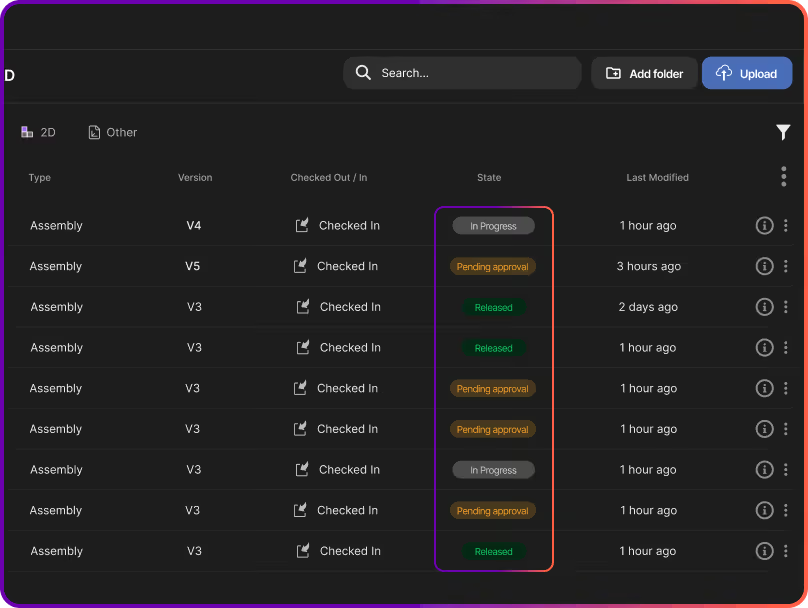
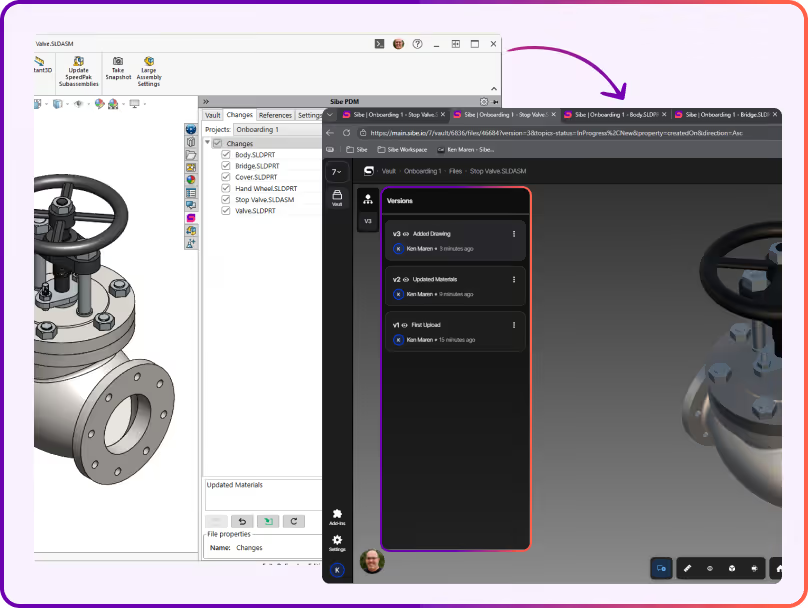
Always know where every design stands
When work moves across multiple engineers and assemblies, it's easy to lose track of what's done, what's in review, and what's still being worked on. Sibe shows the state of every file automatically.
- Every file in the vault shows its current state: in progress, pending approval, or released.
- See version history at a glance, no need to open the file to know when it last changed.
- Released files are locked, so engineers can't accidentally edit approved work.
- Anyone can check progress without interrupting the engineer who owns the file.
The whole team stays aligned without a separate status meeting or spreadsheet.
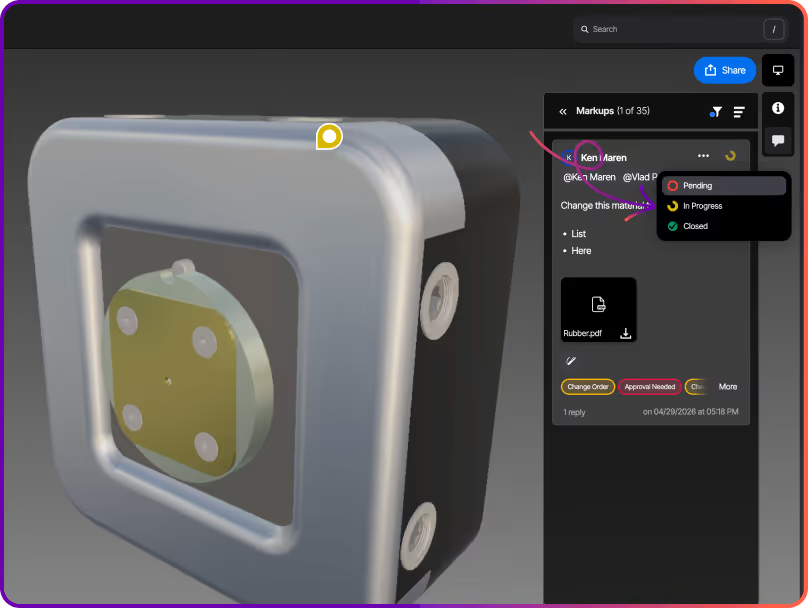
Mark-ups pinned as a task to the designs they belong to
Sibe connects tasks directly to the files and assemblies they relate to, not a separate project board sitting apart from the CAD work.
- Pin mark-ups as tasks to specific parts, subassemblies, or drawings.
- Assign tasks to team members and track completion alongside the design history.
- When the design is updated, the task stays attached to the right version.
- Mark-ups stay visible to whoever opens the file next.
Engineers know what to do next on each component, without switching between SolidWorks and a separate project tracker.

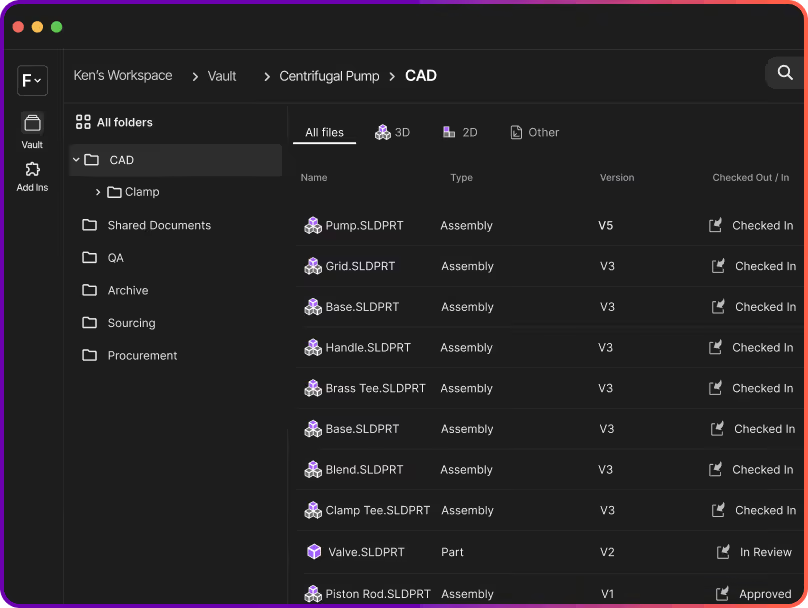
One view across every SolidWorks project
Sibe organizes your SolidWorks projects so that everything, files, versions, tasks, reviews, and approvals lives in one structured space.
- Switch between projects and see current status across all active work.
- Open any file to see its full version history, review comments, and approval state.
- Spot what is waiting for review, what is approved, and what is still in progress without even opening SolidWorks.
- Filter by project, owner, or state to find the work that matters right now.
Project visibility no longer depends on whoever has been working on the files most recently.
Progress that moves with the design workflow
Project tracking in Sibe builds itself as engineers work, not as a separate process layered on top.
- When an engineer checks in a new version in SolidWorks, Sibe updates the project automatically.
- When a reviewer approves a design, the file moves to released.
- When a task is completed, it stays attached to the version it was resolved on.
- No manual updates, no status reports, no chasing engineers for an answer.
The project record is always current, because the work and the record are the same thing.

Suppliers and external reviewers included
Suppliers, contract manufacturers, and clients join the project through secure browser links, with access set to exactly what they need to see.
- Share specific files or project folders with external reviewers.
- Control whether someone can comment or only view.
- Keep the core project structure internal while giving suppliers the visibility they need to stay on track.
- Revoke access in one click when a project closes.
Everyone who touches the project stays informed, without opening up the whole vault.
Share versions easily with non-CAD reviewers
Version control breaks down fastest when a model leaves the engineering team. Sibe makes it easy to share the latest version for review — no more emailing files back and forth.
Send a secure link for any file or assembly.
Reviewers open files in the browser — no SolidWorks license needed.
Feedback stays tied to the exact version reviewed.
Watch it happen live!
IP Protection Without Slowing Collaboration Down
Works for Everyone — Inside and Outside the Company
Sibe is designed for modern engineering teams, where the work doesn't stop at the company boundary. Whether you're co-developing with a partner, getting quotes from a supplier network, or walking a customer through a design review, the sharing experience is the same: fast, secure, and frictionless.
Internal engineers access the vault through the SolidWorks add-in or web app
External partners and customers access via browser link — no account required
No VPN. No IT ticket. No file sent over email.
"We're remote. The designer is in Philadelphia, our CTO is in Miami, and I'm in Austin. We needed a way to design, review, and release without everyone sitting in the same place — or even in the same software."

Alberto Lopez
Chief Executive Officer,
Sunfish
"Our SolidWorks files carry structured product data that people outside the CAD team regularly need to access. Bridging that gap was essential for our global growth."

Dean Pascasio
CAD Engineering Lead,
Nordair Systems
Enterprise-ready Security & Privacy
Everything in Sibe is designed to keep your work safe and secure.
Because your business is nobody else’s business.

SOC 2 Audited
Audited for Service Organization Controls (SOC 2 Type II) compliance.
Data Encryption & Backups
AES-256 encryption with daily backups and disaster recovery protocols.

Google Cloud Partner
Hosted on Google Cloud with data centers in Europe and the United States.
Frequently Asked Questions
How does Sibe track the state of a file automatically?
Every time an engineer checks a file out or in through the SolidWorks add-in, Sibe updates the project version. State changes from In Progress to In Review to Released are reflected immediately across the whole team, with no manual updates or status reports required.
Does Sibe replace my existing SolidWorks folder structure?
Sibe doesn't replace your folder structure, it mirrors it in a local cache folder so the layout your engineers are familiar with stays largely the same. The structure lives in the cache rather than the original location, so it feels familiar without being identical. Your team keeps working in SolidWorks the way they always have, with version control, state tracking, and project visibility added on top.
Can I see the status of all my SolidWorks projects in one place?
Yes. Sibe gives you a single view across every active project, showing each file, its current state, version history, open tasks, and approval status. Drill into any file for the full picture without opening SolidWorks.
How are tasks connected to the actual design files?
Mark-ups in Sibe are pinned directly to specific parts, subassemblies, or drawings in the vault. When a design changes, the task stays attached to the version it belongs to, so engineers always know what needs doing on which component without switching to a separate project tool.
Can external suppliers and reviewers track project progress?
Yes. External reviewers are brought into the project through permission-controlled browser links. You decide which files or folders they see and whether they can view, comment, or download. The core project structure stays internal while suppliers get the visibility they need.
Do external reviewers need a Sibe account or SolidWorks license to view files?
No. A single secure browser link is all they need. As long as they have been given access, they can open and inspect the relevant files in any browser, no account, no license, and no installation required. Access is controlled by you, not by the recipient.
Will Sibe slow my engineers down or change how they work in SolidWorks?
No. The Sibe add-in works inside SolidWorks, so engineers check files in and out directly in SolidWorks. Project tracking happens in the background. Engineers don't need to manage a separate system or change their workflow.
How long does it take to get Sibe set up?
Most teams connect their existing SolidWorks projects and have Sibe running in under 20 minutes. There are no servers to configure, no VPN to set up, and no migration required. The team can start tracking project progress the same day.
What happens to project history when a design goes through multiple revisions?
Every version, task, review comment, and approval decision is logged automatically in Sibe and stays attached to the design throughout its history. You can step back through any previous version to see what the project looked like at that point including who made changes and what was approved.
Is our SolidWorks data safe in Sibe?
Yes. All files are protected with AES-256 encryption in transit and at rest, hosted on Google Cloud infrastructure. Sibe is SOC 2 Type II audited, with daily backups and disaster recovery built in, so your product data is protected wherever your team works from.
Book a free Demo with Ken to see Sibe in action


Ken Maren
Chief Solutions Architect
SolidWorks Expert with 30+ Years Experience
Thank you for requesting a demo.
Our Customer Success team will be in touch within one business day to arrange a suitable time.
Alternatively, please select a time slot directly from the calendar below.
Thank you for your interest!
Our Customer Success team will get back to you within one business day to schedule the demo call.
.png)